# Selection
## Content
Most grid controls allow users to select parts of the data using the mouse and the keyboard. FlexGrid supports selection through the **SelectionMode** property. This property determines how the cell or rows are selected in grid.
### .NET
You can set the selection mode for grid by using [SelectionMode](/componentone/api/wpf/online-flexgrid/dotnet-api/C1.WPF.GridControl/C1.WPF.Grid.C1GridControl.html#SELECTIONMODE) property of the [C1GridControl](/componentone/api/wpf/online-flexgrid/dotnet-api/C1.WPF.GridControl/C1.WPF.Grid.C1GridControl.html) class. The **SelectionMode** property sets the selection behavior through [GridSelectionMode](/componentone/api/wpf/online-flexgrid/dotnet-api/C1.WPF.Grid/C1.WPF.Grid.GridSelectionMode.html) enumeration. This enumeration specifies the following values to define the selection behavior:
| **Selection Mode** | **Description** |
| --- | --- |
| Cell | To select a single cell. |
| CellRange | To select a cell range (block of adjacent cells). |
| Column | To select a single column. |
| ColumnRange | To select a set of contiguous columns. |
| ListBox | To select an arbitrary set of rows (not necessarily contiguous). |
| MultiColumns | To select non-contiguous columns by ctrl+clicking. |
| MultiRange | To select collection of ranges. |
| None | To disable the selection. |
| Row | To select a entire row. |
| RowRange | To select a set of contiguous rows. |
The following image shows selection of a range of cells in FlexGrid.
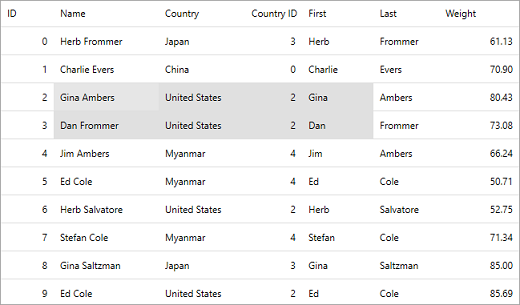
The following code illustrates how to set **SelectionMode** to **CellRange**.
```csharp
grid.SelectionMode=C1.WPF.Grid.GridSelectionMode.CellRange;
```
### .NET Framework
You can set the selection mode for grid by using [SelectionMode](/componentone/api/wpf/online-flexgrid/dotnet-framework-api/C1.WPF.FlexGrid.4.6.2/C1.WPF.FlexGrid.C1FlexGrid.SelectionMode.html) property of the [C1FlexGrid](/componentone/api/wpf/online-flexgrid/dotnet-framework-api/C1.WPF.FlexGrid.4.6.2/C1.WPF.FlexGrid.C1FlexGrid.html) class. The **SelectionMode** property sets the selection behavior through [SelectionMode](/componentone/api/wpf/online-flexgrid/dotnet-framework-api/C1.WPF.FlexGrid.4.6.2/C1.WPF.FlexGrid.SelectionMode.html) enumeration. This enumeration specifies the following values to define the selection behavior:
| **Selection Mode** | **Description** |
| --- | --- |
| Cell | To select a single cell. |
| CellRange | To select a cell range (block of adjacent cells). |
| Column | To select a single column. |
| ColumnRange | To select a set of contiguous columns. |
| ListBox | To select an arbitrary set of rows (not necessarily contiguous). |
| Row | To select a entire row. |
| RowRange | To select a set of contiguous rows. |
The following image shows selection of a range of cells in FlexGrid.
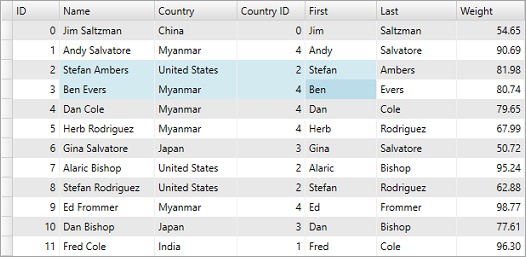
The following code illustrates how to set **SelectionMode** to **CellRange**.
```csharp
grid.SelectionMode= C1.WPF.FlexGrid.SelectionMode.CellRange;
```
## Data Item Selection
FlexGrid provides a series of properties as a part of Selection API that work with data items. These properties are:
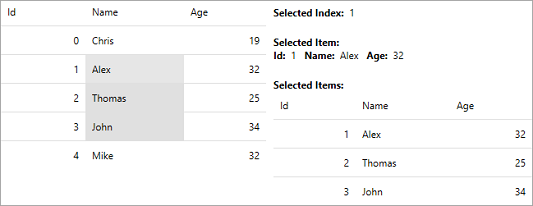
* **SelectedIndex**: Allows to set or get the index of the selected row.
* **SelectedItem**: Allows to set or get a reference to the currently selected data item. The type of the selected item can vary depending on the context and the items contained in the selection control. It can be a string, an object, or any other relevant data type.
* **SelectedItems**: Allows to get a collection of the selected data items. This property is used when working with multi-selection, which allows selecting multiple items simultaneously.
All these properties provide more flexibility in manipulating the selected items at runtime and further customize your application behavior.
The following image shows how Selected Index displays the index of the selected row while the SelectedItem and SelectedItems option display the data items and the collection of data items for the selected row(s), respectively.
To understand how to use these properties, use the following code. In this example, we have used a class named Persons to get the data for FlexGrid.
```xml
```
## See Also
[Monitor Selection in FlexGrid](/componentone/docs/wpf/online-flexgrid/FlexGridFeatures/FlexGrid-Selection/FlexGrid-Selection-Monitoring)
[Select Cells and Objects](/componentone/docs/wpf/online-flexgrid/FlexGridFeatures/FlexGrid-Selection/Cell-Selection)
[Customize Selection Display](/componentone/docs/wpf/online-flexgrid/FlexGridFeatures/FlexGrid-Selection/Customize-Selection-Display)
[C1FlexGrid Class](/componentone/api/wpf/online-flexgrid/dotnet-framework-api/C1.WPF.FlexGrid.4.6.2/C1.WPF.FlexGrid.C1FlexGrid.html)