# Data Binding

## Content

The TreeMap chart control binds to hierarchical data, to represent the elements of tree-like data as nested rectangles. Once the control binds to the data source and displays data items as rectangles, the size and color of these constituting rectangles enable analysis and comparison of data items.

<span data-popup-content="This class is available in \u003ca href=\u0022/componentone/api/wpf/online-flexchart/dotnet-api/C1.WPF.Chart/C1.WPF.Chart.FlexChartBase.html\u0022\u003e.NET\u003c/a\u003e and \u003ca href=\u0022/componentone/api/wpf/online-flexchart/dotnet-api/C1.WPF.Chart/C1.WPF.Chart.FlexChartBase.html\u0022\u003e.NET Framework\u003c/a\u003e." data-popup-title="FlexChartBase" data-popup-theme="ui-tooltip-green qtip-green">FlexChartBase</span> class exposes <span data-popup-content="This property is available in \u003ca href=\u0022/componentone/api/wpf/online-flexchart/dotnet-api/C1.WPF.Chart/C1.WPF.Chart.Series.ItemsSource.html\u0022\u003e.NET\u003c/a\u003e and \u003ca href=\u0022/componentone/api/wpf/online-flexchart/dotnet-api/C1.WPF.Chart/C1.WPF.Chart.Series.ItemsSource.html\u0022\u003e.NET Framework\u003c/a\u003e." data-popup-title="ItemsSource" data-popup-theme="ui-tooltip-green qtip-green">ItemsSource</span> property, which takes collection of the objects, that contain data, to populate in tree map chart. The **Binding** and **BindingName** properties are instrumental in generating rectangular nodes for data items and their respective categories or groups. While **Binding** property takes string value depicting the name of the property of data item that contains numeric data value, helpful in calculating the size of rectangular nodes, **BindingName** takes string value depicting the name of data items. **ChildItemPath** property ensures that a hierarchical structure of the provided data collection is maintained, by communicating to the control about the child items within the data.

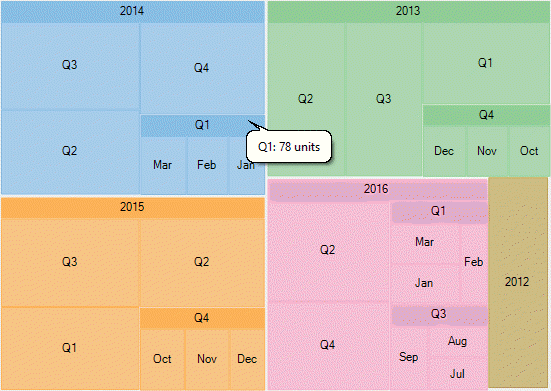
To elaborate how data is populated in a tree map chart, let’s consider a use case where we try to compare yearly sales (in units sold) of a multi-brand retail store. The analysis can then further be drilled down to quarters in a year and then to months in a quarter, by using Treemap chart. Here yearly sales are represented by the top level rectangles, quarterly sales in those years represent the subsequent level, and monthly sales form the next level that is leaf nodes in tree map.

The following image illustrates sales in a retail store, in terms of units sold, through TreeMap chart control. Note that the image shows hierarchical data up to third level, that is months in respective quarters of the years.
![TreeMap comparing sales](https://cdn.mescius.io/document-site-files/images/8ba28e07-1633-4a6a-9114-13b9f1f04eed/images/treemap-databinding.png)

In this example, data generated in DataService class is serving as the source for tree map chart.

1. **Create a hierarchical data source**
    1. In the code view, create a DataService class to generate hierarchical data, as shown in the following code. 
        **vbnet**

        ```vbnet
        Public Class DataService
            Private rnd As New Random()
            Shared _default As DataService
            Public Shared ReadOnly Property Instance() As DataService
                Get
                    If _default Is Nothing Then
                        _default = New DataService()
                    End If
                    Return _default
                End Get
            End Property
            Public Shared Function CreateHierarchicalData() As List(Of DataItem)
                Dim rnd As Random = Instance.rnd
                Dim years As New List(Of String)()
                Dim times As New List(Of List(Of String))() From {
                    New List(Of String)() From {
                        "Jan",
                        "Feb",
                        "Mar"
                    },
                    New List(Of String)() From {
                        "Apr",
                        "May",
                        "June"
                    },
                    New List(Of String)() From {
                        "Jul",
                        "Aug",
                        "Sep"
                    },
                    New List(Of String)() From {
                        "Oct",
                        "Nov",
                        "Dec"
                    }
                }
                Dim items As New List(Of DataItem)()
                Dim yearLen = Math.Max(CInt(Math.Round(Math.Abs(5 - Instance.rnd.NextDouble() * 10))), 3)
                Dim currentYear As Integer = DateTime.Now.Year
                For i As Integer = yearLen To 1 Step -1
                    years.Add((currentYear - i).ToString())
                Next
                Dim quarterAdded = False
                years.ForEach(Function(y)
                                  Dim i = years.IndexOf(y)
                                  Dim addQuarter = Instance.rnd.NextDouble() > 0.5
                                  If Not quarterAdded AndAlso i = years.Count - 1 Then
                                      addQuarter = True
                                  End If
                                  Dim year = New DataItem() With {
                                      .Year = y
                                  }
                                  If addQuarter Then
                                      quarterAdded = True
                                      times.ForEach(Function(q)
                                                        Dim addMonth = Instance.rnd.NextDouble() > 0.5
                                                        Dim idx As Integer = times.IndexOf(q)
                                                        Dim quar As String
                                                        quar = "Q" + (idx + 1).ToString
                                                        Dim quarters = New DataItem() With {
                                                            .Year = y,
                                                            .Quarter = quar
                                                        }
                                                        If addMonth Then
                                                            q.ForEach(Function(m)
                                                                          quarters.Items.Add(New DataItem() With {
                                                                              .Year = y,
                                                                              .Quarter = quar,
                                                                              .Month = m,
                                                                              .Value = rnd.[Next](20, 30)
                                                                          })
                                                                      End Function)
                                                        Else
                                                            quarters.Value = rnd.[Next](80, 100)
                                                        End If
                                                        year.Items.Add(quarters)
                                                    End Function)
                                  Else
                                      year.Value = rnd.[Next](80, 100)
                                  End If
                                  items.Add(year)
                              End Function)
                Return items
            End Function
        End Class
        ```

        **csharp**

        ```csharp
        public class DataService
        {
            Random rnd = new Random();
            static DataService _default;
            public static DataService Instance
            {
                get
                {
                    if (_default == null)
                    {
                        _default = new DataService();
                    }
                    return _default;
                }
            }      
            public static List<DataItem> CreateHierarchicalData()
            {
                Random rnd = Instance.rnd;
                List<string> years = new List<string>();
                List<List<string>> times = new List<List<string>>()
                {
                    new List<string>() { "Jan", "Feb", "Mar"},
                    new List<string>() { "Apr", "May", "June"},
                    new List<string>() { "Jul", "Aug", "Sep"},
                    new List<string>() { "Oct", "Nov", "Dec" }
                };
                List<DataItem> items = new List<DataItem>();
                var yearLen = Math.Max((int)Math.Round(Math.Abs(5 - Instance.rnd.NextDouble() * 10)), 3);
                int currentYear = DateTime.Now.Year;
                for (int i = yearLen; i > 0; i--)
                {
                    years.Add((currentYear - i).ToString());
                }
                var quarterAdded = false;
                years.ForEach(y =>
                {
                    var i = years.IndexOf(y);
                    var addQuarter = Instance.rnd.NextDouble() > 0.5;
                    if (!quarterAdded && i == years.Count - 1)
                    {
                        addQuarter = true;
                    }
                    var year = new DataItem() { Year = y };
                    if (addQuarter)
                    {
                        quarterAdded = true;
                        times.ForEach(q =>
                        {
                            var addMonth = Instance.rnd.NextDouble() > 0.5;
                            int idx = times.IndexOf(q);
                            var quar = "Q" + (idx + 1);
                            var quarters = new DataItem() { Year = y, Quarter = quar };
                            if (addMonth)
                            {
                                q.ForEach(m =>
                                {
                                    quarters.Items.Add(new DataItem()
                                    {
                                        Year = y,
                                        Quarter = quar,
                                        Month = m,
                                        Value = rnd.Next(20, 30)
                                    });
                                });
                            }
                            else
                            {
                                quarters.Value = rnd.Next(80, 100);
                            }
                            year.Items.Add(quarters);
                        });
                    }
                    else
                    {
                        year.Value = rnd.Next(80, 100);
                    }
                    items.Add(year);
                });
                return items;
            }
        }
        ```
    2. Create a DataItem class to define list of objects to represent data items and their categories. 
        **vbnet**

        ```vbnet
        Public Class DataItem
            Private _items As List(Of DataItem)
            Public Property Year() As String
                Get
                    Return m_Year
                End Get
                Set
                    m_Year = Value
                End Set
            End Property
            Private m_Year As String
            Public Property Quarter() As String
                Get
                    Return m_Quarter
                End Get
                Set
                    m_Quarter = Value
                End Set
            End Property
            Private m_Quarter As String
            Public Property Month() As String
                Get
                    Return m_Month
                End Get
                Set
                    m_Month = Value
                End Set
            End Property
            Private m_Month As String
            Public Property Value() As Double
                Get
                    Return m_Value
                End Get
                Set
                    m_Value = Value
                End Set
            End Property
            Private m_Value As Double
            Public ReadOnly Property Items() As List(Of DataItem)
                Get
                    If _items Is Nothing Then
                        _items = New List(Of DataItem)()
                    End If
                    Return _items
                End Get
            End Property
        End Class
        ```

        **csharp**

        ```csharp
        public class DataItem
        {
            List<DataItem> _items;
            public string Year { get; set; }
            public string Quarter { get; set; }
            public string Month { get; set; }
            public double Value { get; set; }
            public List<DataItem> Items
            {
                get
                {
                    if (_items == null)
                    {
                        _items = new List<DataItem>();
                    }
                    return _items;
                }
            }
        }
        ```
2. **Bind TreeMap to the data source**
<br>
    <br>
    To bind the TreeMap control to the data source use the following code.

    ```xml
    <Window
        xmlns="http://schemas.microsoft.com/winfx/2006/xaml/presentation"
        xmlns:x="http://schemas.microsoft.com/winfx/2006/xaml"
        xmlns:d="http://schemas.microsoft.com/expression/blend/2008"
        xmlns:mc="http://schemas.openxmlformats.org/markup-compatibility/2006"
        xmlns:local="clr-namespace:WpfTreeMapCS"
        xmlns:c1="http://schemas.componentone.com/winfx/2006/xaml"
        x:Class="WpfTreeMapCS.DataBinding"
        DataContext="{Binding RelativeSource={RelativeSource Mode=Self}}"
        mc:Ignorable="d"
        Title="DataBinding" Height="300" Width="300">
    <Grid>
        <Grid.DataContext>
            <local:TreeMapViewModel />
        </Grid.DataContext>
        <c1:C1TreeMap Binding="Value" 
                      BindingName="Year,Quarter,Month" 
                      ChildItemsPath="Items" 
                      ItemsSource="{Binding HierarchicalData}"
                      MaxDepth="3">
            <c1:C1TreeMap.DataLabel>
                <c1:DataLabel Content="{}{name}"                              
                              Position="Center">
                    <c1:DataLabel.Style>
                        <c1:ChartStyle/>
                    </c1:DataLabel.Style>
                </c1:DataLabel>
            </c1:C1TreeMap.DataLabel>            
        </c1:C1TreeMap>
    </Grid>
    </Window>
    ```

    **vbnet**

    ```vbnet
    Public Class TreeMapViewModel
        Public ReadOnly Property HierarchicalData() As List(Of DataItem)
            Get
                Return DataService.CreateHierarchicalData()
            End Get
        End Property
    End Class
    ```

    **csharp**

    ```csharp
    public class TreeMapViewModel
    {
        public List<DataItem> HierarchicalData
        {
            get
            {
                return DataService.CreateHierarchicalData();
            }
        }
    }
    ```
3. **Build and run the project**
    1. Click **Build \| Build Solution** to build the project.
    2. Press **F5** to run the project.

## See Also

[Quick Start](/componentone/docs/wpf/online-flexchart/TreeMapOverview/TreeMapQuickStart)

[Elements](/componentone/docs/wpf/online-flexchart/TreeMapOverview/TreeMapElements)