# Selection

## Content


The Sunburst chart lets you select data points by clicking a Sunburst slice. You can set the **SelectionMode** property provided by the <span data-popup-content="This class is available in \u003ca href=\u0022/componentone/api/wpf/online-flexchart/dotnet-api/C1.WPF.Chart/C1.WPF.Chart.FlexChartBase.html\u0022\u003e.NET\u003c/a\u003e and \u003ca href=\u0022/componentone/api/wpf/online-flexchart/dotnet-api/C1.WPF.Chart/C1.WPF.Chart.FlexChartBase.html\u0022\u003e.NET Framework\u003c/a\u003e." data-popup-title="FlexChartBase" data-popup-theme="ui-tooltip-green qtip-green">FlexChartBase</span> class to either of the following values in the **ChartSelectionMode** enumeration:

*   **None (default)**: Selection is disabled.
*   **Point**: A point is selected.

To customize the selection, you can use the **SelectedItemOffset** and the **SelectedItemPosition** property provided by the C1<span data-popup-content="This class is available in \u003ca href=\u0022/componentone/api/wpf/online-flexchart/dotnet-api/C1.WPF.Chart/C1.WPF.Chart.FlexPie.html\u0022\u003e.NET\u003c/a\u003e and \u003ca href=\u0022/componentone/api/wpf/online-flexchart/dotnet-framework-api/C1.WPF.FlexChart.4.6.2/C1.WPF.Chart.C1FlexPie.html\u0022\u003e.NET Framework\u003c/a\u003e." data-popup-title="FlexPie" data-popup-theme="ui-tooltip-green qtip-green">FlexPie</span> class. The SelectedItemOffset property enables you to specify the offset of the selected Sunburst slice from the center of the control. And the SelectedItemPosition property allows you to specify the position of the selected Sunburst slice. The SelectedItemPosition property accepts values from the Position enumeration. Setting this property to a value other than 'None' causes the pie to rotate when an item is selected.

In addition, the <span data-popup-content="This class is available in \u003ca href=\u0022/componentone/api/wpf/online-flexchart/dotnet-api/C1.WPF.Chart/C1.WPF.Chart.FlexChartBase.html\u0022\u003e.NET\u003c/a\u003e and \u003ca href=\u0022/componentone/api/wpf/online-flexchart/dotnet-api/C1.WPF.Chart/C1.WPF.Chart.FlexChartBase.html\u0022\u003e.NET Framework\u003c/a\u003e." data-popup-title="FlexChartBase" data-popup-theme="ui-tooltip-green qtip-green">FlexChartBase</span> class provides the **SelectionStyle** property that can be used to access the properties provided by the <span data-popup-content="This class is available in \u003ca href=\u0022/componentone/api/wpf/online-flexchart/dotnet-api/C1.WPF.Chart/C1.WPF.Chart.ChartStyle.html\u0022\u003e.NET\u003c/a\u003e and \u003ca href=\u0022/componentone/api/wpf/online-flexchart/dotnet-api/C1.WPF.Chart/C1.WPF.Chart.ChartStyle.html\u0022\u003e.NET Framework\u003c/a\u003e." data-popup-title="ChartStyle" data-popup-theme="ui-tooltip-green qtip-green">ChartStyle</span> class to style the Sunburst chart.

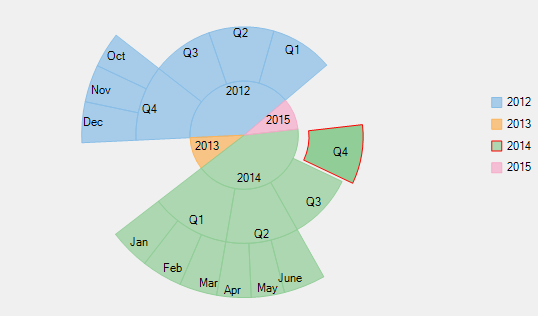
The following image displays Sunburst chart with a data point selected.
![](https://cdn.mescius.io/document-site-files/images/8ba28e07-1633-4a6a-9114-13b9f1f04eed/images/selection.png)

The following code snippet sets these properties:

**xml**

```xml
<c1:C1Sunburst x:Name="sunburst" 
               SelectionMode="Point" 
               SelectedItemOffset="0.1" 
               SelectedItemPosition="Top" 
               Header="Quarterly Sales" 
               Footer="Company XYZ" 
               Reversed="True" 
               Palette="Dark" 
               Offset="0.1" 
               ItemsSource="{Binding HierarchicalData}" 
               Binding="Value" 
               BindingName="Year,Quarter,Month" 
               ChildItemsPath="Items" 
               ToolTipContent="{}{name}&#x000A;{y}" 
               Height="439" 
               VerticalAlignment="Bottom" 
               LegendOrientation="Vertical" 
               LegendTitle="Year" >
    <c1:C1Sunburst.LegendStyle>
        <c1:ChartStyle FontFamily="Arial" 
                       FontSize="9" 
                       Stroke="DarkCyan"/>
    </c1:C1Sunburst.LegendStyle>
    <c1:C1Sunburst.LegendTitleStyle>
        <c1:ChartStyle FontFamily="Arial" 
                       FontSize="10" 
                       Stroke="Blue"/>
    </c1:C1Sunburst.LegendTitleStyle>
    <c1:C1Sunburst.HeaderStyle>
        <c1:ChartStyle FontFamily="Arial" 
                       FontSize="11" 
                       FontWeight="Bold" 
                       Stroke="Brown"/>
    </c1:C1Sunburst.HeaderStyle>
    <c1:C1Sunburst.FooterStyle>
        <c1:ChartStyle FontFamily="Arial" 
                       FontSize="10" 
                       FontWeight="Bold" 
                       Stroke="Brown"/>
    </c1:C1Sunburst.FooterStyle>
    <c1:C1Sunburst.DataLabel>
        <c1:PieDataLabel Position="Center" 
                         Content="{}{name}" />
    </c1:C1Sunburst.DataLabel>
</c1:C1Sunburst>
```

### Code

```csharp
// set the SelectionMode property
sunburst.SelectionMode = C1.Chart.ChartSelectionMode.Point;
// set the SelectedItemOffset property
sunburst.SelectedItemOffset = 0.1;
// set the SelectedItemPosition property 
sunburst.SelectedItemPosition = C1.Chart.Position.Top;
```

<br />

```vbnet
' set the SelectionMode property
sunburst.SelectionMode = C1.Chart.ChartSelectionMode.Point
' set the SelectedItemOffset property
sunburst.SelectedItemOffset = 0.1
' set the SelectedItemPosition property 
sunburst.SelectedItemPosition = C1.Chart.Position.Top
```