# Legend and Titles
## Content
### Legend
The legend displays entries for series with their names and predefined symbols. In Sunburst, you can perform various customizations with the legend, as follows:
* **Orientation**: Set the orientation of the legend as horizontal, vertical, or automatic by using the [LegendOrientation](/componentone/api/wpf/online-flexchart/dotnet-api/C1.WPF.Chart/C1.WPF.Chart.FlexChartBase.LegendOrientation.html) property provided by the [FlexChartBase](/componentone/api/wpf/online-flexchart/dotnet-api/C1.WPF.Chart/C1.WPF.Chart.FlexChartBase.html) class. The property can be set to any of the values from the [Orientation](/componentone/docs/wpf/online-flexchart/) enumeration.
* **Position**: Set the legend on top, bottom, left, right, or let it be positioned automatically by using the [LegendPosition](/componentone/api/wpf/online-flexchart/dotnet-api/C1.WPF.Chart/C1.WPF.Chart.FlexChartBase.LegendPosition.html) property that accepts values from the [Position](/componentone/docs/wpf/online-flexchart/) enumeration. Setting the Position property to None hides the legend.
* **Styling**: Customize the overall appearance of the legend, such as setting stroke color or changing font by using styling properties accessible through the [LegendStyle](/componentone/api/wpf/online-flexchart/dotnet-api/C1.WPF.Chart/C1.WPF.Chart.FlexChartBase.LegendStyle.html) property. The styling properties [Stroke](/componentone/api/wpf/online-flexchart/dotnet-api/C1.WPF.Chart/C1.WPF.Chart.ChartStyle.Stroke.html), [FontSize](/componentone/api/wpf/online-flexchart/dotnet-api/C1.WPF.Chart/C1.WPF.Chart.ChartStyle.FontSize.html), and [FontStyle](/componentone/api/wpf/online-flexchart/dotnet-api/C1.WPF.Chart/C1.WPF.Chart.ChartStyle.FontStyle.html) are provided by the [ChartStyle](/componentone/api/wpf/online-flexchart/dotnet-api/C1.WPF.Chart/C1.WPF.Chart.ChartStyle.html) class.
* **Title and title styling**: Specify the legend title using the [LegendTitle](/componentone/api/wpf/online-flexchart/dotnet-api/C1.WPF.Chart/C1.WPF.Chart.FlexChartBase.LegendTitle.html) property that accepts a string. Once you have set the title, you can style it using the [LegendTitleStyle](/componentone/api/wpf/online-flexchart/dotnet-api/C1.WPF.Chart/C1.WPF.Chart.FlexChartBase.LegendTitleStyle.html) property that provides access to the customization properties of the ChartStyle class.
### Header and Footer
Header and Footer are descriptive texts at the top and bottom of the chart that provide information about the overall chart data. You can access Header and Footer of Sunburst chart by using the [Header](/componentone/api/wpf/online-flexchart/dotnet-api/C1.WPF.Chart/C1.WPF.Chart.FlexChartBase.Header.html) and the [Footer](/componentone/api/wpf/online-flexchart/dotnet-api/C1.WPF.Chart/C1.WPF.Chart.FlexChartBase.Footer.html) property respectively, of the FlexChartBase class. Possible customizations with Header and Footer are as follows:
* **Font**: Change the font family, font size, and font style of Header and Footer using the various font properties of the ChartStyle class accessible through the [HeaderStyle](/componentone/api/wpf/online-flexchart/dotnet-api/C1.WPF.Chart/C1.WPF.Chart.FlexChartBase.HeaderStyle.html) or [FooterStyle](/componentone/api/wpf/online-flexchart/dotnet-api/C1.WPF.Chart/C1.WPF.Chart.FlexChartBase.FooterStyle.html) property of the FlexChartBase class.
* **Stroke**: Set stroke of the titles for enhanced appeal by using the [Stroke](/componentone/api/wpf/online-flexchart/dotnet-api/C1.WPF.Chart/C1.WPF.Chart.ChartStyle.Stroke.html) property.
The following image displays Sunburst chart with the legend and titles set.
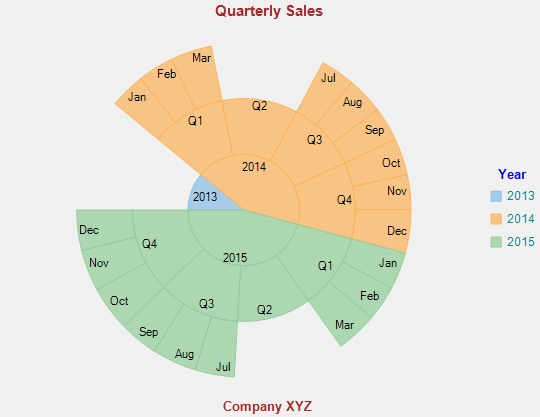
The following code snippet illustrates how to set respective properties for the legend and titles customization. This code uses the sample created in [Quick Start](/componentone/docs/wpf/online-flexchart/SunburstChart/SunburstQuickStart).
**xml**
```xml
```
### Code
```csharp
// set the legend orientation
sunburst.LegendOrientation = C1.Chart.Orientation.Vertical;
// set the legend position
sunburst.LegendPosition = C1.Chart.Position.Auto;
// Set the legend font
sunburst.LegendStyle.FontSize = 9;
// Set the legend font style
sunburst.LegendStyle.FontStyle = FontStyles.Normal;
// set the legend title
sunburst.LegendTitle = "Year";
// set the legend title font
sunburst.LegendTitleStyle.FontSize = 10;
// set the legend title font style
sunburst.LegendTitleStyle.FontStyle = FontStyles.Normal;
// set the header
sunburst.Header = "Quarterly Sales";
// set the header font
sunburst.HeaderStyle.FontSize = 11;
// set the header font style
sunburst.HeaderStyle.FontStyle = FontStyles.Normal;
// set the header stroke
sunburst.HeaderStyle.Stroke = Brushes.Brown;
// set the footer
sunburst.Footer = "Company XYZ";
// set the footer font size
sunburst.FooterStyle.FontSize = 10;
// set the footer font style
sunburst.FooterStyle.FontStyle = FontStyles.Normal;
// set the footer stroke
sunburst.FooterStyle.Stroke = Brushes.Brown;
```
```vbnet
' set the legend orientation
sunburst.LegendOrientation = C1.Chart.Orientation.Vertical
' set the legend position
sunburst.LegendPosition = C1.Chart.Position.Auto
' Set the legend font
sunburst.LegendStyle.FontSize = 9
' Set the legend font style
sunburst.LegendStyle.FontStyle = FontStyles.Normal
' set the legend title
sunburst.LegendTitle = "Year"
' set the legend title font
sunburst.LegendTitleStyle.FontSize = 10
' set the legend title font style
sunburst.LegendTitleStyle.FontStyle = FontStyles.Normal
' set the header
sunburst.Header = "Quarterly Sales"
' set the header font
sunburst.HeaderStyle.FontSize = 11
' set the header font style
sunburst.HeaderStyle.FontStyle = FontStyles.Normal
' set the header stroke
sunburst.HeaderStyle.Stroke = Brushes.Brown
' set the footer
sunburst.Footer = "Company XYZ"
' set the footer font size
sunburst.FooterStyle.FontSize = 10
' set the footer font style
sunburst.FooterStyle.FontStyle = FontStyles.Normal
' set the footer stroke
sunburst.FooterStyle.Stroke = Brushes.Brown
```