# Quick Start
## Content
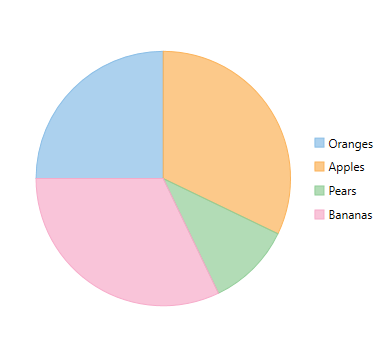
This quick start is intended to guide you through a step-by-step process of creating a simple FlexPie application and running the same in Visual Studio.
Complete the following steps to see how FlexPie appears on running the application:
### Adding FlexPie to the Application
1. Create a **WPF** **Application (.NET Framework/.NET Core)** for **.NET Framework** version and **.NET** versions in Visual Studio.
2. Drag and drop the **C1FlexPie** control to the MainWindow.
The following dlls or Nuget Packages are automatically added to the application:
**C1.WPF.4.6.2** or **C1.WPF.Core** for **.NET** version
**C1.WPF.DX.4.6.2** or **C1.WPF.DX** for **.NET** version
**C1.WPF.FlexChart.4.6.2** or **C1.WPF.Chart** for **.NET** version.
The XAML markup resembles the following code in the **\\** tags.
3. **xml**
```xml
```
### Binding FlexPie to a Data Source
1. Add a class **DataCreator** and add the following code.
**vbnet**
```vbnet
Public Class DataCreator
Public Shared Function CreateFruit() As List(Of FruitDataItem)
Dim fruits = New String() {"Oranges", "Apples", "Pears", "Bananas"}
Dim count = fruits.Length
Dim result = New List(Of FruitDataItem)()
Dim rnd = New Random()
For i As Object = 0 To count - 1
result.Add(New FruitDataItem() With {
.Fruit = fruits(i),
.March = rnd.[Next](20),
.April = rnd.[Next](20),
.May = rnd.[Next](20)
})
Next
Return result
End Function
End Class
Public Class FruitDataItem
Public Property Fruit() As String
Get
Return m_Fruit
End Get
Set
m_Fruit = Value
End Set
End Property
Private m_Fruit As String
Public Property March() As Double
Get
Return m_March
End Get
Set
m_March = Value
End Set
End Property
Private m_March As Double
Public Property April() As Double
Get
Return m_April
End Get
Set
m_April = Value
End Set
End Property
Private m_April As Double
Public Property May() As Double
Get
Return m_May
End Get
Set
m_May = Value
End Set
End Property
Private m_May As Double
End Class
```
**csharp**
```csharp
using System;
using System.Collections.Generic;
using System.Linq;
using System.Text;
using System.Threading.Tasks;
namespace FlexPieQuickStart
{
class DataCreator
{
public static List CreateFruit()
{
var fruits = new string[] { "Oranges", "Apples", "Pears", "Bananas" };
var count = fruits.Length;
var result = new List();
var rnd = new Random();
for (var i = 0; i < count; i++)
result.Add(new FruitDataItem()
{
Fruit = fruits[i],
March = rnd.Next(20),
April = rnd.Next(20),
May = rnd.Next(20),
});
return result;
}
}
public class FruitDataItem
{
public string Fruit { get; set; }
public double March { get; set; }
public double April { get; set; }
public double May { get; set; }
}
}
```
2. Edit the XAML markup to provide data to FlexPie.
**xml**
```xml
```
>type=note
> To specify the binding source, you need to add the **DataContext = "{Binding RelativeSource={RelativeSource Mode=Self}}"** markup in the **\** tag of the **MainWindow.xaml** file.
3. Switch to **Code view** and add the following code.
**vbnet**
```vbnet
Partial Public Class MainWindow
Inherits Window
Private _data As List(Of FruitDataItem)
Public Sub New()
InitializeComponent()
End Sub
Public ReadOnly Property Data() As List(Of FruitDataItem)
Get
If _data Is Nothing Then
_data = DataCreator.CreateFruit()
End If
Return _data
End Get
End Property
End Class
```
**csharp**
```csharp
using System;
using System.Collections.Generic;
using System.Linq;
using System.Text;
using System.Threading.Tasks;
using System.Windows;
using System.Windows.Controls;
using System.Windows.Data;
using System.Windows.Documents;
using System.Windows.Input;
using System.Windows.Media;
using System.Windows.Media.Imaging;
using System.Windows.Navigation;
using System.Windows.Shapes;
namespace FlexPieQuickStart
{
public partial class MainWindow : Window
{
List _data;
public MainWindow()
{
InitializeComponent();
}
public List Data
{
get
{
if (_data == null)
{
_data = DataCreator.CreateFruit();
}
return _data;
}
}
}
}
```
### Running the Application
Press F5 to run the application and observe the following output.