# Numerical Axis Grouping
## Content
Numerical axis grouping is applicable in scenarios where the data displayed on the axis represents numeric values. To implement numerical axis grouping in FlexChart, set the GroupProvider property to an object of the [IAxisGroupProvider](/componentone/docs/wpf/online-flexchart/) implementation.
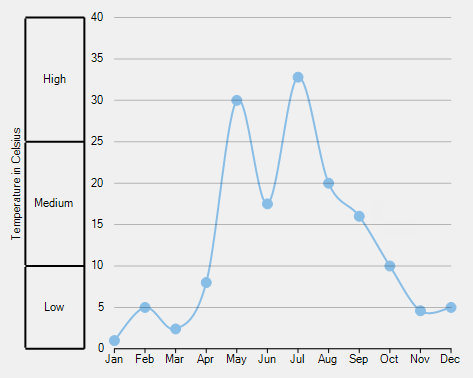
In the example code below, we have created a class **NumericAxisGroupProvider** that implements the IAxisGroupProvider interface. The interface provides [GetLevels](/componentone/docs/wpf/online-flexchart/) method that returns the group levels and [GetRanges](/componentone/docs/wpf/online-flexchart/) method that returns the group ranges for a given level. Moreover, FlexChart allows you to set the group separator using the [GroupSeparator](/componentone/api/wpf/online-flexchart/dotnet-api/C1.WPF.Chart/C1.WPF.Chart.Axis.GroupSeparator.html) property.
The following image shows how FlexChart appears after setting the numerical axis grouping.
Add the following code in Index.xaml.
**xml**
```xml
```
### Code
```
public NumericAxisGrouping()
{
InitializeComponent();
flexChart.AxisY.GroupProvider = new NumericAxisGroupProvider();
}
class NumericAxisGroupProvider : IAxisGroupProvider
{
public int GetLevels(IRange range)
{
return 1;
}
public IList GetRanges(IRange range, int level)
{
var ranges = new List();
if (level == 1)
{
ranges.Add(new DoubleRange("Low", 0, 10));
ranges.Add(new DoubleRange("Medium", 10, 25));
ranges.Add(new DoubleRange("High", 25, 40));
}
return ranges;
}
}
```