# Adding a Control to the Content Area
## Content
Each accordion pane ([C1AccordionItem](/componentone/api/wpf/online-extended/dotnet-framework-api/C1.WPF.Extended.4.6.2/C1.WPF.Extended.C1AccordionItem.html)) will accept one child control in its content area. In this topic, you will add a WPF button control in Design view, in XAML, and in code.
This topic assumes that you have added a [C1Accordion](/componentone/api/wpf/online-extended/dotnet-framework-api/C1.WPF.Extended.4.6.2/C1.WPF.Extended.C1Accordion.html) control with at least one **C1AccordionItem** item to your project.
**At Design Time in Design view**
To add a **Button** control to the content area, complete the following steps:
1. Select the accordion pane you wish to add the control to.
2. Double click the **Button** icon to add it to the accordion pane's content area.
3. In the designer, select the Button control so that its properties take focus in the Properties window.
4. Set the **Width** property to **"Auto"**.
5. Set the **Height** property to **"Auto"**.
6. Run the program and expand the accordion pane to reveal the button control.
**In XAML**
To add a **Button** control to the content area in XAML, complete the following:
1. Place the following markup between the `` and `` tags:
```xml
```
2. Run the program and expand the accordion pane to reveal the button control.
**In Code**
To add a **Button** control to the content area in code, complete the following:
1. Enter Code view and add the following code beneath the **InitializeComponent()** method:
```vbnet
'Create the Button control
Dim NewButton As New Button()
NewButton.Content = "Button"
'Set the Button Control's Width and Height properties
NewButton.Width = Double.NaN
NewButton.Height = Double.NaN
'Add the Button to the content area
C1AccordionItem1.Content = (NewButton)
```
```csharp
//Create the Button control
Button NewButton = new Button();
NewButton.Content = "Button";
//Set the Button Control's Width and Height properties
NewButton.Width = double.NaN;
NewButton.Height = double.NaN;
//Add the Button to the content area
c1AccordionItem1.Content = (NewButton);
```
2. Run the program and expand the accordion pane to reveal the button control.
**This Topic Illustrates the Following**:
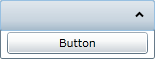
When accordion pane is expanded, the button control will appear in its content area, resembling the following image: