# Appearance and Styling
## Content
Expression Editor supports customizing its appearance by changing the look of its elements.
**C1ExpressionEditorPanel** class provides following properties to modify the appearance of Expression Editor's panel.
| **Properties** | **Purpose** |
| --- | --- |
| ButtonBackground | Modifies the background color of buttons inside the control. |
| ButtonForeground | Modifies the foreground color of buttons inside the control. |
| MoveOverBrush | Highlights the buttons when mouse is hovered on the buttons inside the control. |
| Background | Modifies the background color of the control. |
| Foreground | Modifies the foreground color of the control. |
| BorderThickness | Adjusts the thickness of the control's border. |
| BorderBrush | Modifies the color of the control's border. |
| FontFamily | Modifies the font of the text inside the control. |
| FontStyle | Modifies the style (Italic, Normal, or Oblique) in which the font is rendered. |
| FontSize | Modifies the font size of the text inside the control. |
| FontStretch | Specifies how the font of the control will expand or condense. |
| FontWeight | Modifies the thickness of control's font. |
**C1ExpressionEditor** class provides following properties to modify the appearance of Expression Editor's text box.
| **Properties** | **Purpose** |
| --- | --- |
| Background | Modifies the background color of the control. |
| Foreground | Modifies the foreground color of the control. |
| BorderThickness | Adjusts the thickness of the control's border. |
| BorderBrush | Modifies the color of the control's border. |
| FontFamily | Modifies the font of the text inside the control. |
| FontStyle | Modifies the style (Italic, Normal, or Oblique) in which the font is rendered. |
| FontSize | Modifies the font size of the text inside the control. |
| FontStretch | Specifies how the font of the control will expand or condense. |
| FontWeight | Modifies the thickness of control's font. |
The following image illustrates customizing the appearance of Expression Editor.
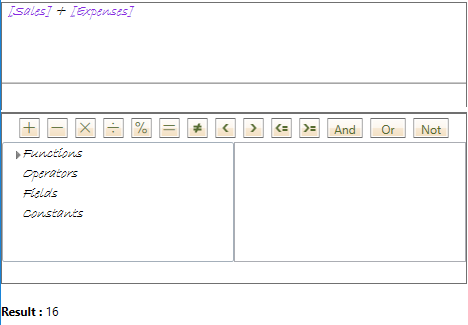
The following code demonstrates changing the appearance of Expression Editor control.
**csharp**
```csharp
ExpressionEditor.FontFamily = new FontFamily("Bradley Hand ITC");
ExpressionEditor.FontSize = 14;
ExpressionEditor.FontStyle = FontStyles.Italic;
ExpressionEditor.FontWeight = FontWeights.Light;
ExpressionPanel.FontFamily = new FontFamily("Bradley Hand ITC");
ExpressionPanel.ButtonBackground = new SolidColorBrush(Colors.BlanchedAlmond);
ExpressionPanel.ButtonForeground = new SolidColorBrush(Colors.DarkOliveGreen);
ExpressionPanel.MouseOverBrush = new SolidColorBrush(Colors.BurlyWood);
ExpressionPanel.FontSize = 14;
ExpressionPanel.FontStyle = FontStyles.Italic;
ExpressionPanel.FontWeight = FontWeights.Light;
```
## See Also
[End-User Capabilities](/componentone/docs/wpf/online-expressioneditor/Features/End-UserCapabilities)
**Common Topics**
[Features](/componentone/docs/wpf/online-expressioneditor/Features)