# Docking Diamond and Zones

## Content


The docking diamond is used to show where <span data-popup-content="This class is available in \u003ca href=\u0022/componentone/api/wpf/online-dockcontrol/dotnet-api/C1.WPF.Docking/C1.WPF.Docking.C1DockControl.html\u0022\u003e.NET\u003c/a\u003e and \u003ca href=\u0022/componentone/api/wpf/online-dockcontrol/dotnet-api/C1.WPF.Docking/C1.WPF.Docking.C1DockControl.html\u0022\u003e.NET Framework\u003c/a\u003e." data-popup-title="C1DockControl" data-popup-theme="ui-tooltip-green qtip-green">C1DockControl</span> elements can be docked.

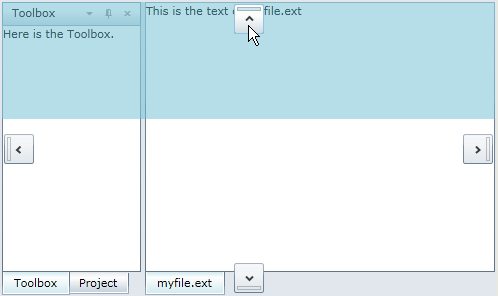
The **C1DockControl** provides four docking indicators so you can dock at the top, right, bottom, or left side of the control.

Drag the <span data-popup-content="This class is available in \u003ca href=\u0022/componentone/api/wpf/online-dockcontrol/dotnet-api/C1.WPF.Docking/C1.WPF.Docking.C1DockTabControl.html\u0022\u003e.NET\u003c/a\u003e and \u003ca href=\u0022/componentone/api/wpf/online-dockcontrol/dotnet-api/C1.WPF.Docking/C1.WPF.Docking.C1DockTabControl.html\u0022\u003e.NET Framework\u003c/a\u003e." data-popup-title="C1DockTabControl" data-popup-theme="ui-tooltip-green qtip-green">C1DockTabControl</span> header, and blue docking zones will appear showing you where you can dock the window.
![](https://cdn.mescius.io/document-site-files/images/071cfce4-8a59-4c77-94ca-7b05c2184e6d/graphics/c1dockcontrolindicators.png)

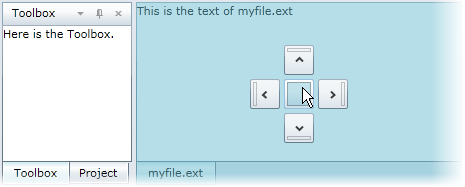
If you have multiple **C1DockTabControls**, drag one of the **C1DockTabControl** headers over one of the other **C1DockTabControls**. You will notice the docking diamond shows five docking indicators, including top, right, bottom, left, and a center docking indicator that allows you to merge the **C1DockTabItems** into one **C1DockTabControl**.
![](https://cdn.mescius.io/document-site-files/images/071cfce4-8a59-4c77-94ca-7b05c2184e6d/graphics/c1docktabcontrolindicators2.png)

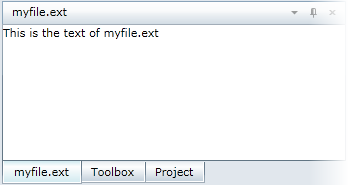
Using the previous image's example, if the mouse is released over the center indicator, the _myfile.ext_ **C1DockTabItem** will appear with the other **C1DockTabItems** in the first **C1DockTabControl**.
![](https://cdn.mescius.io/document-site-files/images/071cfce4-8a59-4c77-94ca-7b05c2184e6d/graphics/c1docktabcontrolindicators3.png)