# Filter Expressions
## Content
The **FilterEditor** allows end-users to create complex filter criteria by adding filter combinations and operations as nodes. The TreeView based filtering UI can be attached to any control or information screen. For every operation, the control shows drop-down menu with available options.
### Filter Combination
You can create complex filter expressions by adding logical filter combinations using CombinationExpression class which uses **FilterCombination** Enumeration of **C1.DataCollection** to add AND/OR logical functions. The table below describes the available logical functions.
| **Function** | **Description** |
| --- | --- |
| AND | The function returns TRUE if all the arguments are TRUE. |
| OR | The function returns TRUE if any argument is TRUE. |
### Filter Operation
Further, you need to add the filter operations using OperationExpression class which enables the user to select the property name to which the expression applies, value of filter expression, and type of logical operation according to the selected field type using **FilterOperation** Enumeration of **C1.DataCollection**. The table below describes the available logical operators.
| **Condition** | **Description** |
| --- | --- |
| Equal | Returns the values equal to the entered value. |
| NotEqual | Returns the values not equal to the entered value. |
| GreaterThan | Returns the values greater than the entered value. |
| GreaterThanOrEqual | Returns the values greater than or equal to the entered value. |
| LessThan | Returns the values less than the entered value. |
| LessThanOrEqual | Returns the values less than or equal to the entered value. |
| EqualText | Returns the values equal to the entered text. |
| NotEqualText | Returns the values not equal to the entered text. |
| Contains | Returns the values containing entered value. |
| StartsWith | Returns the values starting with entered value. |
| EndsWith | Returns the values ending with entered value. |
| IsOneOf | Returns the value one of the entered values. |
The image below shows the creation of filter expression by adding different combinations and operations.
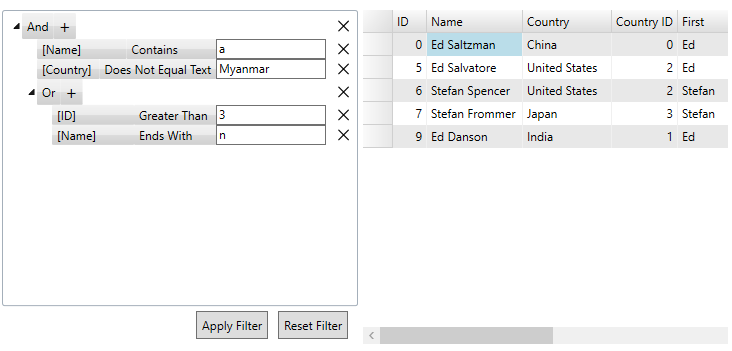
Below code example demonstrates the implementation of Filter Combinations and Operations in FilterEditor as shown in the above scenario.
**csharp**
```csharp
private static CombinationExpression GetPredefinedFilter()
{
var filterExpression = new CombinationExpression();
var filterExpressions = filterExpression.Expressions;
var NameContainsExpression = new OperationExpression()
{
// Adding first operation to AND combination
PropertyName = "Name",
FilterOperation = FilterOperation.Contains,
Value = "a"
};
filterExpressions.Add(NameContainsExpression);
var CountryNotEqualExpression = new OperationExpression()
{
// Adding second operation to AND combination
PropertyName = "Country",
FilterOperation = FilterOperation.NotEqualText,
Value = "Myanmar"
};
filterExpressions.Add(CountryNotEqualExpression);
//Adding new Or combination
var OrExpression = new CombinationExpression();
OrExpression.FilterCombination = FilterCombination.Or;
var brandExpressions = OrExpression.Expressions;
//Adding first operation to OR combination
var IDGreaterThanExpression = new OperationExpression()
{
PropertyName = "ID",
FilterOperation = FilterOperation.GreaterThan,
Value = "3"
};
brandExpressions.Add(IDGreaterThanExpression);
//Adding second operation to OR combination
var NameEndsWithExpression = new OperationExpression()
{
PropertyName = "Name",
FilterOperation = FilterOperation.EndsWith,
Value = "n"
};
brandExpressions.Add(NameEndsWithExpression);
filterExpressions.Add(OrExpression);
return filterExpression;
}
```
**vbnet**
```vbnet
Private Shared Function GetPredefinedFilter() As CombinationExpression
Dim filterExpression = New CombinationExpression()
Dim filterExpressions = filterExpression.Expressions
' Adding first operation to And combination
Dim NameContainsExpression = New OperationExpression() With {
.PropertyName = "Name",
.FilterOperation = FilterOperation.Contains,
.Value = "a"
}
filterExpressions.Add(NameContainsExpression)
' Adding second operation to And combination
Dim CountryNotEqualExpression = New OperationExpression() With {
.PropertyName = "Country",
.FilterOperation = FilterOperation.NotEqualText,
.Value = "Myanmar"
}
filterExpressions.Add(CountryNotEqualExpression)
' Adding new Or combination
Dim OrExpression = New CombinationExpression()
OrExpression.FilterCombination = FilterCombination.[Or]
Dim brandExpressions = OrExpression.Expressions
' Adding first operation to OR combination
Dim IDGreaterThanExpression = New OperationExpression() With {
.PropertyName = "ID",
.FilterOperation = FilterOperation.GreaterThan,
.Value = "3"
}
brandExpressions.Add(IDGreaterThanExpression)
' Adding second operation to Or combination
Dim NameEndsWithExpression = New OperationExpression() With {
.PropertyName = "Name",
.FilterOperation = FilterOperation.EndsWith,
.Value = "n"
}
brandExpressions.Add(NameEndsWithExpression)
filterExpressions.Add(OrExpression)
Return filterExpression
End Function
```
### Apply and Clear Filter
To apply the filter conditions given in example above, C1FilterEditor provides **ApplyFilterAsync** method that applies the filter to the data source asynchronously. You can also use **ClearFilter** method that removes all the expressions from the filter as shown in the GIF below.
To implement apply and clear filter feature, you can use the following code example.
**csharp**
```csharp
// Apply Filter asynchronously to filter
ApplyFilterAsync();
// Remove expressions from filter
FilterEditor.ClearFilter();
```
**vbnet**
```vbnet
' Apply Filter asynchronously to filter
ApplyFilterAsync()
' Remove expressions from filter
FilterEditor.ClearFilter()
```