# Adding Floor
## Content
**Chart3D for WPF and Silverlight** allows you to give your charts a 2D representation by displaying contours and zones on the top, or ceiling, and bottom, or floor, of the plot cube of the chart.
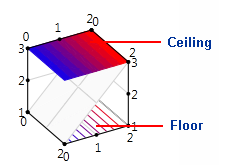
To determine the appearance of the floor, set the [FloorAppearance](/componentone/api/wpf/online-chart3d/dotnet-framework-api/C1.WPF.C1Chart3D.4.6.2/C1.WPF.C1Chart3D.C1Chart3D.FloorAppearance.html) property. In the following example, the XAML sets the **FloorAppearance** of a **SurfaceZone** chart to **Contour**.
```xml
```
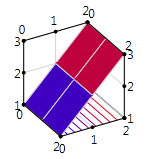
To determine the appearance of the ceiling, set the [CeilAppearance](/componentone/api/wpf/online-chart3d/dotnet-framework-api/C1.WPF.C1Chart3D.4.6.2/C1.WPF.C1Chart3D.C1Chart3D.CeilAppearance.html) property. In the following example, the XAML sets the **CeilAppearance** of a **SurfaceContour** chart to **Zone**.
```xml
```
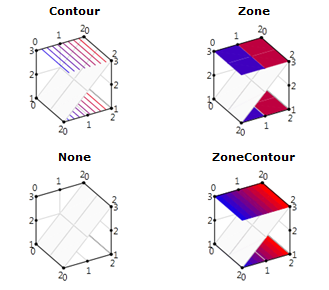
The **FloorAppearance** and **CeilAppearance** properties offer four appearance options:
## See Also
[Creating a Two-Dimensional Chart](/componentone/docs/wpf/online-chart3d/overview/using-chart3d-for-wpf-and-silverlight/Creating)