# Display Modes
The Calendar UI can be set in different display modes. Read the topic to learn how to set the different view modes.
## Content
Calendar supports different presentations of the calendar, such as views, date, first day of the week and calendar type. The same is explained in the following sections.
### View
Calendar supports three different views, namely month, year and decade view. By default, the calendar displays month view showing the month. The Calendar control allows you to navigate between the views using the calendar header.

The table below depicts the three different types of view modes:
| **View Modes** | **Snapshot** |
| --- | --- |
| Month | 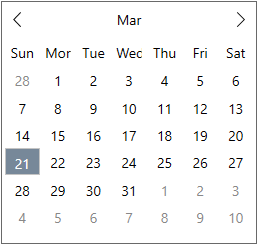 |
| Year | 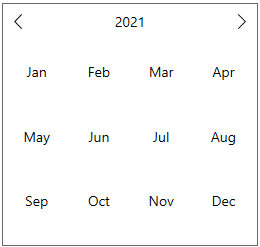 |
| Decade |  |
**[C1Calendar](/componentone/api/wpf/online-calendar/dotnet-api/C1.WPF.Calendar/C1.WPF.Calendar.C1Calendar.html)** class provides the [ViewMode](/componentone/api/wpf/online-calendar/dotnet-api/C1.WPF.Calendar/C1.WPF.Calendar.C1Calendar.ViewMode.html) property to set a value indicating whether the calendar displays a month, year or decade view. The ViewMode property accesses the [CalendarViewMode](/componentone/api/wpf/online-calendar/dotnet-api/C1.WPF.Calendar/C1.WPF.Calendar.CalendarViewMode.html) enumeration to change the calendar view.
The following code demonstrates how to set the year view for the calendar.
```xml
```
### Display Date
The Calendar control lets you set a value specifying the currently displayed date of the year. This is by default, the date when the application is created. But, you can also change the date by setting the [DisplayDate](/componentone/api/wpf/online-calendar/dotnet-api/C1.WPF.Calendar/C1.WPF.Calendar.C1Calendar.DisplayDate.html) property to a particular date as you wish. It also lets you easily change the selected month or year of the Calendar control.
```xml
```
### First Day of Week
The Calendar control provides the [FirstDayOfWeek](/componentone/api/wpf/online-calendar/dotnet-api/C1.WPF.Calendar/C1.WPF.Calendar.C1Calendar.FirstDayOfWeek.html) property to assign one of the week days as the first day of the week. By default, the Calendar control provides Sunday as the first day of the week, the one displayed in the first column of the calendar. But, you can manually set the FirstDayofWeek, let's say, as Monday.
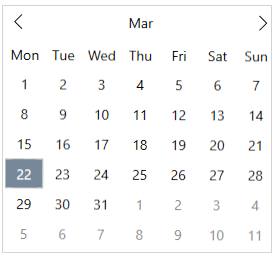
The code snippet below depicts setting the **FirstDayOfWeek** property in Calendar:
```xml
```
### Calendar Type
The Calendar control lets you set two types of calendar, one is Gregorian, and the other is Japanese.
The following table lists the two types of calendars:
| **Calendar Type** | **Snapshot** |
| --- | --- |
| Gregorian calendar | 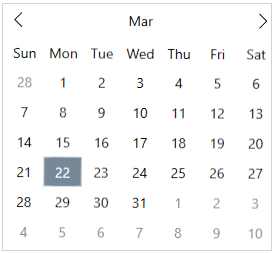 |
| Japanese calendar | 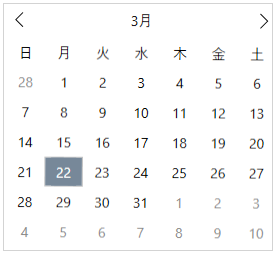 |
The Calendar Type can be set by using the [CalendarType](/componentone/api/wpf/online-calendar/dotnet-api/C1.WPF.Calendar/C1.WPF.Calendar.C1Calendar.CalendarType.html) property as shown in the code snippet below:
```xml
```