# Appearance and Styling

Learn how to customize the foreground, header, navigation buttons etc. in Calendar control.

## Content


Calendar provides various options to customize the appearance of the control and all its elements individually, so that you can style and display the Calendar control as per your requirement. The [C1Calendar](/componentone/api/wpf/online-calendar/dotnet-api/C1.WPF.Calendar/C1.WPF.Calendar.C1Calendar.html) class provides several properties such as [PrevIconStyle](/componentone/api/wpf/online-calendar/dotnet-api/C1.WPF.Calendar/C1.WPF.Calendar.C1Calendar.PrevIconStyle.html)**,** [NextIconStyle](/componentone/api/wpf/online-calendar/dotnet-api/C1.WPF.Calendar/C1.WPF.Calendar.C1Calendar.NextIconStyle.html), [HeaderStyle](/componentone/api/wpf/online-calendar/dotnet-api/C1.WPF.Calendar/C1.WPF.Calendar.C1Calendar.HeaderStyle.html), [DayOfWeekStyle](/componentone/api/wpf/online-calendar/dotnet-api/C1.WPF.Calendar/C1.WPF.Calendar.C1Calendar.DayOfWeekStyle.html), [DayStyle](/componentone/api/wpf/online-calendar/dotnet-api/C1.WPF.Calendar/C1.WPF.Calendar.C1Calendar.DayStyle.html), [MonthStyle](/componentone/api/wpf/online-calendar/dotnet-api/C1.WPF.Calendar/C1.WPF.Calendar.C1Calendar.MonthStyle.html), [YearStyle](/componentone/api/wpf/online-calendar/dotnet-api/C1.WPF.Calendar/C1.WPF.Calendar.C1Calendar.YearStyle.html), [TodayStyle](/componentone/api/wpf/online-calendar/dotnet-api/C1.WPF.Calendar/C1.WPF.Calendar.C1Calendar.TodayStyle.html), [AdjacentDayStyle](/componentone/api/wpf/online-calendar/dotnet-api/C1.WPF.Calendar/C1.WPF.Calendar.C1Calendar.AdjacentDayStyle.html), [SelectionStyle](/componentone/api/wpf/online-calendar/dotnet-api/C1.WPF.Calendar/C1.WPF.Calendar.C1Calendar.SelectionStyle.html) etc. These properties offer different ways of styling and customizing the appearance of the Calendar control along with all its elements such as drop-down button, header, calendar, etc.
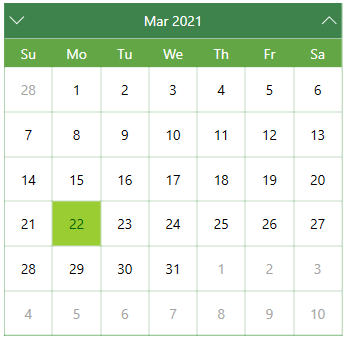
![Styled calendar UI with green background](https://cdn.mescius.io/document-site-files/images/aa932af9-ea21-4e7f-9114-1f57bdf10e97/images/styling-calendar.png)

The following code demonstrates the use of the available styling and appearance properties in the C1Calendar class to change the appearance of the Calendar control:

```xml
<!-- For styling Calendar control -->
<UserControl.Resources>
        <Style x:Key="CalendarSlotBaseStyle" TargetType="Control">
            <Setter Property="Foreground" Value="White"></Setter>
            <Setter Property="Background" Value="White"></Setter>
            <Setter Property="FontSize" Value="15"></Setter>
            <Setter Property="FontFamily" Value="Corbel"></Setter>
            <Setter Property="FontWeight" Value="ExtraBold"></Setter>
        </Style>
        <Style x:Key="CalendarDaySlotBaseStyle" TargetType="Control" BasedOn="{StaticResource CalendarSlotBaseStyle}">
            <Setter Property="BorderBrush" Value="DarkSeaGreen"></Setter>
            <Setter Property="BorderThickness" Value="0.5"></Setter>
        </Style>
        <Style x:Key="CalendarHeaderStyle" TargetType="Control" BasedOn="{StaticResource CalendarSlotBaseStyle}">
            <Setter Property="BorderThickness" Value="0"></Setter>
            <Setter Property="Background" Value="#FF3D834B"></Setter>
        </Style>
        <Style x:Key="AdjacentDayStyle" TargetType="Control" BasedOn="{StaticResource CalendarDaySlotBaseStyle}">
            <Setter Property="Foreground" Value="#FFA5A5A3"></Setter>
        </Style>
        <Style x:Key="CalendarDayOfWeekStyle" TargetType="Control" BasedOn="{StaticResource CalendarSlotBaseStyle}">
            <Setter Property="Background" Value="#FF63A646"></Setter>
        </Style>
        <Style x:Key="CalendarDayStyle" TargetType="Control" BasedOn="{StaticResource CalendarDaySlotBaseStyle}">
            <Setter Property="Foreground" Value="Black"></Setter>
        </Style>
        <Style x:Key="CalendarMonthStyle" TargetType="Control" BasedOn="{StaticResource CalendarDaySlotBaseStyle}">
            <Setter Property="Background" Value="DarkSeaGreen"></Setter>
            <Setter Property="FontWeight" Value="Bold"></Setter>
            <Setter Property="FontSize" Value="28"></Setter>
        </Style>
        <Style x:Key="CalendarYearStyle" TargetType="Control" BasedOn="{StaticResource CalendarDaySlotBaseStyle}">
            <Setter Property="Background" Value="DarkSeaGreen"></Setter>
            <Setter Property="FontWeight" Value="Bold"></Setter>
            <Setter Property="FontSize" Value="28"></Setter>
        </Style>
        <Style x:Key="CalendarSelectionStyle" TargetType="Control" BasedOn="{StaticResource CalendarDaySlotBaseStyle}">
            <Setter Property="Background" Value="GreenYellow"></Setter>
            <Setter Property="Foreground" Value="DarkGreen"></Setter>
        </Style>
        <Style x:Key="CalendarTodayStyle" TargetType="Control" BasedOn="{StaticResource CalendarDaySlotBaseStyle}">
            <Setter Property="Background" Value="YellowGreen"></Setter>
            <Setter Property="Foreground" Value="DarkGreen"></Setter>
        </Style>
        <Style x:Key="IconStyle" TargetType="Control">
            <Setter Property="Width" Value="15"></Setter>
            <Setter Property="Foreground" Value="White"></Setter>
        </Style>
    </UserControl.Resources>
    <!-- Calendar control and its styling properties-->
    <Border>
        <c1:C1Calendar
            PrevIconStyle="{StaticResource IconStyle}"
            NextIconStyle="{StaticResource IconStyle}"
            HeaderStyle="{StaticResource CalendarHeaderStyle}"
            DayOfWeekStyle="{StaticResource CalendarDayOfWeekStyle}"
            DayStyle="{StaticResource CalendarDayStyle}"
            MonthStyle="{StaticResource CalendarMonthStyle}"
            YearStyle="{StaticResource CalendarYearStyle}"
            TodayStyle="{StaticResource CalendarTodayStyle}"
            AdjacentDayStyle="{StaticResource AdjacentDayStyle}"
            SelectionStyle="{StaticResource CalendarSelectionStyle}"
            Width="500"
            Height="450"
            Name="calendar"
            DayOfWeekFormat="dd"
            ShowAdjacentDay="True"
            ShowNavigationButtons="True"
            ShowHeader="True"         
            HeaderMonthFormat="MMM yyyy"
            Foreground="DarkGreen"
            BorderThickness="0.75"
            BorderBrush="ForestGreen"
            Orientation="Vertical">
        </c1:C1Calendar>
    </Border>
```