# Customization

Learn how to customize barcodes using C1Barcode.

## Content


The Barcode provides the necessary API to customize the appearance of the control. Users can set a definite bar height and bar direction for this purpose. Let's explore customization in detail.

## Set Height of the Bars in the Barcode

To control the height of the bars in the Barcode control, the <span data-popup-content="This class is available in both \u003ca href=\u0022/componentone/api/wpf/online-barcode/dotnet-api/C1.WPF.BarCode/C1.WPF.BarCode.C1BarCode.html\u0022\u003e.NET\u003c/a\u003e and .\u003ca href=\u0022/componentone/api/wpf/online-barcode/dotnet-api/C1.WPF.BarCode/C1.WPF.BarCode.C1BarCode.html\u0022\u003eNET Framework\u003c/a\u003e." data-popup-title="C1BarCode" data-popup-theme="ui-tooltip-green qtip-green">C1BarCode</span> class provides the <span data-popup-content="This property is available in .\u003ca href=\u0022/componentone/api/wpf/online-barcode/dotnet-api/C1.WPF.BarCode/C1.WPF.BarCode.C1BarCode.BarHeight.html\u0022\u003eNET\u003c/a\u003e and .\u003ca href=\u0022/componentone/api/wpf/online-barcode/dotnet-api/C1.WPF.BarCode/C1.WPF.BarCode.C1BarCode.BarHeight.html\u0022\u003eNET framework\u003c/a\u003e." data-popup-title="BarHeight" data-popup-theme="ui-tooltip-green qtip-green">BarHeight</span> property. With this, you can set the height, in inches, of the barcode's bars. However, if the bar height exceeds the height of the control, this property is ignored.

**xml**

```xml
<c1:C1BarCode Name="barCode1" Text="ComponentOne@123" CodeType="Ansi39x" BarHeight="110" HorizontalAlignment="Left" Margin="134,217,0,0" VerticalAlignment="Top"/>
```

**csharp**

```csharp
barCode1.Text = "ComponentOne@123";
barCode1.CodeType = C1.BarCode.CodeType.Ansi39;
// Set bar height in inches
barCode1.BarHeight = 110;
```

## Set the Direction of Bars in the Barcode

To control the direction of bars in the Barcode control, the <span data-popup-content="This class is available in both \u003ca href=\u0022/componentone/api/wpf/online-barcode/dotnet-api/C1.WPF.BarCode/C1.WPF.BarCode.C1BarCode.html\u0022\u003e.NET\u003c/a\u003e and .\u003ca href=\u0022/componentone/api/wpf/online-barcode/dotnet-api/C1.WPF.BarCode/C1.WPF.BarCode.C1BarCode.html\u0022\u003eNET Framework\u003c/a\u003e." data-popup-title="C1BarCode" data-popup-theme="ui-tooltip-green qtip-green">C1BarCode</span> class provides the <span data-popup-content="The property is available in both \u003ca href=\u0022/componentone/api/wpf/online-barcode/dotnet-api/C1.WPF.BarCode/C1.WPF.BarCode.C1BarCode.BarDirection.html\u0022\u003e.NET\u003c/a\u003e and .\u003ca href=\u0022/componentone/api/wpf/online-barcode/dotnet-api/C1.WPF.BarCode/C1.WPF.BarCode.C1BarCode.BarDirection.html\u0022\u003eNET framework\u003c/a\u003e." data-popup-title="BarDirection" data-popup-theme="ui-tooltip-green qtip-green">BarDirection</span> property that sets the directions using the [BarCodeDirection](/componentone/api/wpf/online-barcode/dotnet-api/C1.WPF.BarCode/C1.BarCode.BarCodeDirection.html) enumeration.

There are four types of values for this enumeration:

| **BarCode Direction values** | **Description** |
| --- | --- |
| LeftToRight | The barcode symbol is printed left to right. This is the default option. |
| RightToLeft | The barcode symbol is printed right to left. |
| BottomToTop | The barcode symbol is printed bottom to top. |
| TopToBottom | The barcode symbol is printed top to bottom. |

Let's see how to set the direction of bars in barcode via code:

**xml**

```xml
<c1:C1BarCode Name="barCode1"  CodeType="Code_128_B" CaptionPosition="Below" Text="ComponentOne@123" BarDirection="RightToLeft" HorizontalAlignment="Center" Height="38" Margin="0,73,0,0" VerticalAlignment="Top" Width="530"/>
```

**csharp**

```csharp
barCode1.Text = "ComponentOne@123";
barCode1.CodeType = C1.BarCode.CodeType.Code_128_B;
// Set bar direction
barCode1.BarDirection = C1.BarCode.BarCodeDirection.RightToLeft;
```

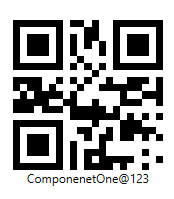
The barcode in its default barcode direction looks like this:
![Default direction in barcode snapshot](https://cdn.mescius.io/document-site-files/images/9c23eff8-ba0d-4b5c-a723-61a3b90aaebc/images/barcode-default-direction.png)

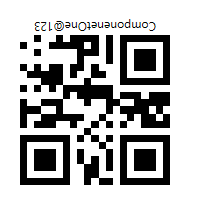
The output of the code snippet with bar direction as RightToLeft looks like this:
![Barcode snapshot with RTL direction](https://cdn.mescius.io/document-site-files/images/9c23eff8-ba0d-4b5c-a723-61a3b90aaebc/images/barcode-rtlt-direction.png)