# Line Marker
## Content
Line Marker displays the precise data values for a given position on the chart by dragging horizontal and/or vertical lines over the plot with an attached label. It is useful in scenarios, where a user has a lot of data in a line or area chart, or if a user wants to display data from multiple series in a single label. With built-in interactions, such as drag and move. a user can drag the line marker and more precisely select the data point on the chart.
To create a line marker and use it in FlexChart, you need to create an instance of the [C1LineMarker](/componentone/api/winui/online-winui/dotnet-api/C1.WinUI.Chart/C1.WinUI.Chart.C1LineMarker.html) class and add it to the Layers collection of the chart by using [Layers](/componentone/api/winui/online-winui/dotnet-api/C1.WinUI.Chart/C1.WinUI.Chart.FlexChart.Layers.html) property of the [FlexChart](/componentone/api/winui/online-winui/dotnet-api/C1.WinUI.Chart/C1.WinUI.Chart.FlexChart.html) class. You can also set the visibility of the LineMarker lines by using the [Lines](/componentone/api/winui/online-winui/dotnet-api/C1.WinUI.Chart/C1.WinUI.Chart.C1LineMarker.Lines.html) property provided by **C1LineMarker** class. The **Lines** property accepts the following values from the [LineMarkerLines](/componentone/api/winui/online-winui/dotnet-api/C1.WinUI.Chart/C1.WinUI.Chart.LineMarkerLines.html) enumeration:
* **Both**: Shows both vertical and horizontal lines
* **Horizontal**: Shows a horizontal line
* **Vertical**: Shows a vertical line
* **None**: Shows no line
Additionally, you can set the interaction mode of the line marker by setting the [Interaction](/componentone/api/winui/online-winui/dotnet-api/C1.WinUI.Chart/C1.WinUI.Chart.C1LineMarker.Interaction.html) property of the C1LineMarker class to any of the following values in the [LineMarkerInteraction](/componentone/api/winui/online-winui/dotnet-api/C1.WinUI.Chart/C1.WinUI.Chart.LineMarkerInteraction.html) enumeration:
* **Drag**: Allows the line marker to move when the user drags the line.
* **Move**: Allows the line marker move with the pointer. It is the default value for the interaction mode.
* **None**: Does not allow any interaction. The user can specify the position by clicking.
Note that if you set the **Interaction** property to **Drag**, you need to set the [DragContent](/componentone/api/winui/online-winui/dotnet-api/C1.WinUI.Chart/C1.WinUI.Chart.C1LineMarker.DragContent.html) and [DragLines](/componentone/api/winui/online-winui/dotnet-api/C1.WinUI.Chart/C1.WinUI.Chart.C1LineMarker.DragLines.html) properties to specify whether the content and values linked with the line marker lines are draggable or not. Furthermore, you can set the initial position of the line marker relative to the plot area with the help of [VerticalPosition](/componentone/api/winui/online-winui/dotnet-api/C1.WinUI.Chart/C1.WinUI.Chart.C1LineMarker.VerticalPosition.html) and [HorizontalPostion](/componentone/api/winui/online-winui/dotnet-api/C1.WinUI.Chart/C1.WinUI.Chart.C1LineMarker.HorizontalPosition.html) properties. The acceptable range for these properties is [0,1\].
## **Position Line Marker Content**
When using line markers, the content displayed with them can sometimes hide the chart or plot area, making it difficult to read. To improve clarity and visualization, you can position the line marker content outside the plot area by using the [Alignment](/componentone/api/winui/online-winui/dotnet-api/C1.WinUI.Chart/C1.WinUI.Chart.C1LineMarker.Alignment.html) property of the **C1LineMarker** class. This property specifies the marker's position relative to the plotted data using the [LineMarkerAlignment](/componentone/api/winui/online-winui/dotnet-api/C1.WinUI.Chart/C1.WinUI.Chart.LineMarkerAlignment.html) enumeration, which offers the following options which allow you to easily place the line marker content outside the plot area and over the axes for enhanced readability.
| **Options** | **Description** |
| --- | --- |
| PlotTop | Aligns the line marker to the top of the pointer. |
| PlotBottom | Displays the line marker content at the bottom of the plot, below the plot area. |
| PlotRight | Displays the line marker content on the right side of the plot. |
| PlotLeft | Displays the line marker content on the left side of the plot. |
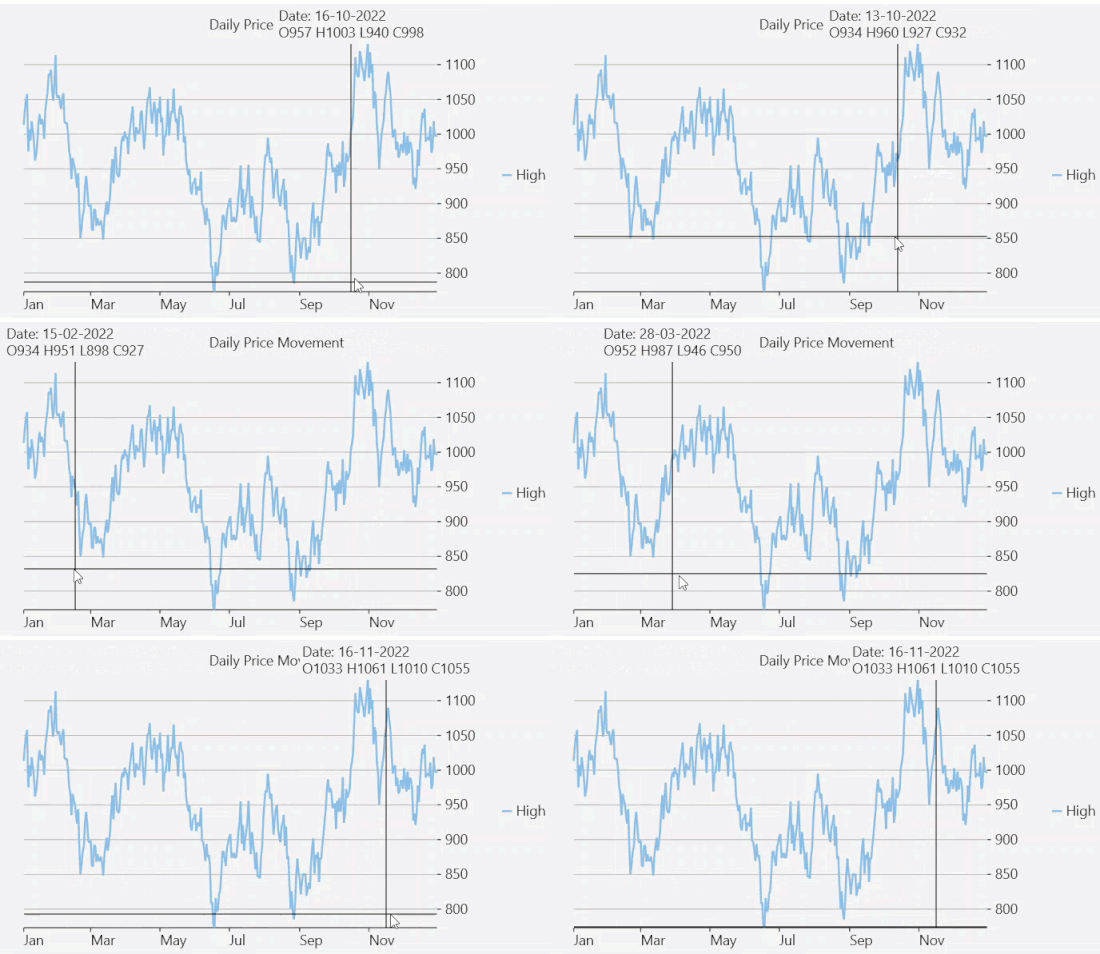
The following code showcases how to align the line marker content at the top of the pointer.
**XAML Code**
```LINEMARKER.xml
```
**Code**
```csharp
Dataservicecountry dataService = Dataservicecountry.GetService();
public Linemarker()
{
this.InitializeComponent();
}
void PositionChanged(object sender, PositionChangedArgs e)
{
var pt = e.Position;
var dataPoint = flexChart.PointToData(e.Position);
var date = DateTime.FromOADate(dataPoint.X);
var i = (int)(date.Date - Data[0].Date).TotalDays;
if (i >= 0 && i < Data.Count)
{
var item = Data[i];
marker.Content =
$"Date: {item.Date.ToShortDateString()}\n" +
$"O{item.Open} H{item.High} L{item.Low} C{item.Close}";
}
}
List _data;
public List Data => _data != null ? _data : _data = dataService.CreateFinancialData(new DateTime(2022, 1, 1), 365);
```