# Quick Start

## Content


The following quick start guide is intended to get you up and running with the Expander control. In this quick start, you'll start with creating a new WinUI application, add the Expander control to it, and add ListBox in the content area of the Expander control.

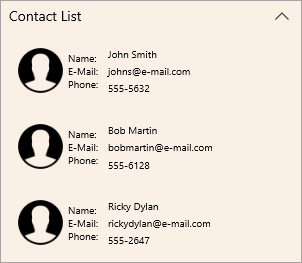
The following image displays a contact list in the Expander control created using the ListBox control.
![](https://cdn.mescius.io/document-site-files/images/2d49eac2-0942-4770-99ef-52b14e6815bd/images/expander-contact-list.png)

## Create a WinUI Application and add References

1.  In Visual Studio, create a new WinUI App. For detailed steps, see [Configure WinUI Application](/componentone/docs/winui/online-winui/configuring-winui-app).
2.  In the **Solution Explorer**, right click **Dependencies** and select **Manage NuGet Packages**.
3.  In **NuGet Package Manager**, select **nuget.org** as the **Package source**.
4.  Search and select the following package and click **Install**.
    *   **C1.WinUI.Accordion**
    *   **C1.WinUI.Core**

## Configure the Expander control

1.  Declare the namespace using the following code in XAML:<br />
    
    ```xml
    xmlns:c1 ="using:C1.WinUI.Accordion"
    ```
    
2.  Place the cursor between the \<Grid>\</Grid> tag to add the Expander control and ListBox as content in the Expander control using the following code:<br />
    
    ```xml
    <c1:C1Expander x:Name="expander" Header="Contact List" MaxWidth="300" VerticalAlignment="Top" HorizontalAlignment="Center" IsExpanded="False" Background="Linen"  Margin="40,20,40,20">
        <!--ListBox used as Expander content-->
        <ListBox Background="Transparent" BorderThickness="0">
            <!--ListBoxItem 1-->
            <ListBoxItem>
                <Grid>
                    <Grid.ColumnDefinitions>
                        <ColumnDefinition Width="55" />
                        <ColumnDefinition Width="*" />
                    </Grid.ColumnDefinitions>
                    <Image Source="\IconImages\contact_icon.png"></Image>
                    <TextBlock Text="Name:  &#xA;E-Mail: &#xA;Phone:" TextWrapping="Wrap" Grid.Column="1" d:LayoutOverrides="HorizontalAlignment" HorizontalAlignment="Left" FontSize="10" VerticalAlignment="Center"/>
                    <TextBlock Text="John Smith" TextWrapping="Wrap" Grid.Column="1" HorizontalAlignment="Stretch" FontSize="10" VerticalAlignment="Top" Margin="40,4,0,0" />
                    <TextBlock Text="johns@e-mail.com" TextWrapping="Wrap" Grid.Column="1" HorizontalAlignment="Stretch" FontSize="10" d:LayoutOverrides="Height" VerticalAlignment="Center" Margin="40,0,0,0" />
                    <TextBlock Text="555-5632" TextWrapping="Wrap" Grid.Column="1" HorizontalAlignment="Stretch" FontSize="10" VerticalAlignment="Bottom" Margin="40,0,0,3" />
                </Grid>
            </ListBoxItem>
            <!--ListBoxItem 2-->
            <ListBoxItem>
                <Grid>
                    <Grid.ColumnDefinitions>
                        <ColumnDefinition Width="55" />
                        <ColumnDefinition Width="*" />
                    </Grid.ColumnDefinitions>
                    <Image Source="\IconImages\contact_icon.png"></Image>
                    <TextBlock Text="Name:  &#xA;E-Mail: &#xA;Phone:" TextWrapping="Wrap" Grid.Column="1" Width="44" d:LayoutOverrides="HorizontalAlignment" HorizontalAlignment="Left" FontSize="10" VerticalAlignment="Center" />
                    <TextBlock Text="Bob Martin" TextWrapping="Wrap" Grid.Column="1" HorizontalAlignment="Stretch" FontSize="10" Margin="40,4,0,0" VerticalAlignment="Top" />
                    <TextBlock Text="bobmartin@e-mail.com" TextWrapping="Wrap" Grid.Column="1" d:LayoutOverrides="HorizontalAlignment" HorizontalAlignment="Left" FontSize="10" VerticalAlignment="Center" Margin="40,0,0,0" />
                    <TextBlock Text="555-6128" TextWrapping="Wrap" Grid.Column="1" HorizontalAlignment="Stretch" FontSize="10" VerticalAlignment="Bottom" Margin="40,0,0,2" />
                </Grid>
            </ListBoxItem>
            <!--ListBoxItem 3-->
            <ListBoxItem>
                <Grid>
                    <Grid.ColumnDefinitions>
                        <ColumnDefinition Width="55" />
                        <ColumnDefinition Width="*" />
                    </Grid.ColumnDefinitions>
                    <Image Source="\IconImages\contact_icon.png"></Image>
                    <TextBlock Text="Name:  &#xA;E-Mail: &#xA;Phone:" TextWrapping="Wrap" Grid.Column="1" Width="44" d:LayoutOverrides="HorizontalAlignment" HorizontalAlignment="Left" FontSize="10" VerticalAlignment="Center" />
                    <TextBlock Text="Ricky Dylan" TextWrapping="Wrap" Grid.Column="1" HorizontalAlignment="Stretch" FontSize="10" VerticalAlignment="Top" Margin="40,4,0,0" />
                    <TextBlock Text="rickydylan@e-mail.com" TextWrapping="Wrap" Grid.Column="1" HorizontalAlignment="Stretch" FontSize="10" VerticalAlignment="Center" Margin="40,0,0,0" />
                    <TextBlock Text="555-2647" TextWrapping="Wrap" Grid.Column="1" HorizontalAlignment="Stretch" FontSize="10" VerticalAlignment="Bottom" Margin="40,0,0,3" />
                </Grid>
            </ListBoxItem>
        </ListBox>
    </c1:C1Expander>
    ```
    

## Build and Run the Project

1.  Click **Build | Build Solution** to build the project.
2.  Press **F5** to run the project.