# Format
## Content
The Calendar control allows you to set date formats for the calendar header month and day of the week. Let us learn about setting the format in the following sections.
### Header Month Format
Calendar lets you to set the format used to display the month of the year in the header when the view mode is 'month'. By default, the format is "MMM". However, you can change the format using the [HeaderMonthFormat](/componentone/api/winui/online-winui/dotnet-api/C1.WinUI.Calendar/C1.WinUI.Calendar.C1Calendar.HeaderMonthFormat.html) property. The following image shows "MMMM yyyy" format for the displayed calendar month.
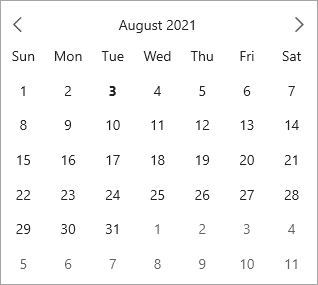
The following code demonstrates the change in format of the month by setting **HeaderMonthFormat** property to "MMMM yyyy":
```xml
```
### Day of Week Format
Calendar allows you to specify formats for displaying the names of the days in a week and the calendar months. You can set the format for representing the names of days in a week by using [DayOfWeekFormat](/componentone/api/winui/online-winui/dotnet-api/C1.WinUI.Calendar/C1.WinUI.Calendar.C1Calendar.DayOfWeekFormat.html) property of the [C1Calendar](/componentone/api/winui/online-winui/dotnet-api/C1.WinUI.Calendar/C1.WinUI.Calendar.C1Calendar.html) class. The following image shows "dddd" format set for the days of the week in a calendar month.
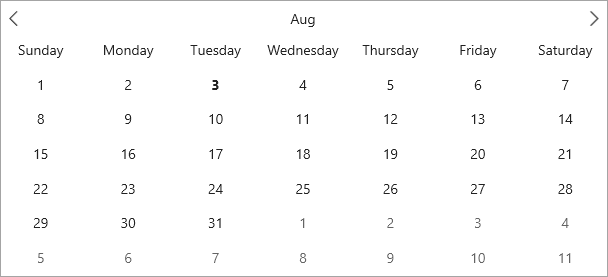
The following code showcases the use of **DayOfWeekFormat** property to set the "dddd" day format in Calendar, respectively.
```xml
```