# Styling and Appearance
## Content
BarCode provides various options to style the appearance of the control, so that you can generate Barcode as per your requirement and change the look and feel of the application you are creating.
## Foreground and Background
The Barcode control provides **Foreground** and **Background** properties available in the **C1BarCode** class to set the foreground and background color of the barcode respectively.
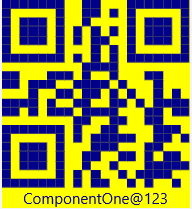
In the above image, we have created a barcode with DarkBlue foreground and Yellow background colors.
You can set the Foreground and Background properties of the Barcode control using the following code snippet:
**xml**
```xml
```
**csharp**
```csharp
barCode.Background = new SolidColorBrush(Windows.UI.Color.FromArgb(255,0,0, 255));
barCode.Foreground = new SolidColorBrush(Windows.UI.Color.FromArgb(255, 204, 255, 0));
```
## Caption Style
Barcode lets you customize the overall look of the text or caption, not to just increase its aesthetic value but also increases its readability. Barcode provides different properties such as FonrStyle, FontFamily, FontStretch, FontSize and FontWeight to change the appearance of the caption and make it more appealing. In our case, we have used FontStyle, FontFamily and FontSize property to style the caption.
In the image below, the barcode has the caption text in italics style, Verdana font and size 13 .
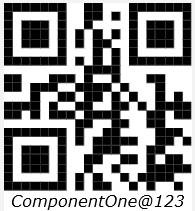
You can style the Barcode text using the following code snippet:
**xml**
```xml
```
**csharp**
```csharp
barCode.FontFamily= new Microsoft.UI.Xaml.Media.FontFamily("Verdana");
barCode.FontSize = 13;
barCode.FontStyle = Windows.UI.Text.FontStyle.Italic;
```