# Layout and Size
## Content
The [C1BarCode](/componentone/api/winui/online-winui/dotnet-api/C1.WinUI.BarCode/C1.WinUI.BarCode.C1BarCode.html) class provides several properties that are used to customize the appearance of barcode such as direction, height etc.. The properties can be set easily either using XAML or C# to their predefined values for rendering barcodes. The description of these properties is as follows:
## BarDirection
You can change the direction of barcode by using the [BarDirection](/componentone/api/winui/online-winui/dotnet-api/C1.WinUI.BarCode/C1.WinUI.BarCode.C1BarCode.BarDirection.html) property of the **C1BarCode** class. The **BarDirection** property provides the following values using the **BarCodeDirection** enumeration to set the direction of barcode:
| **Values** | **Description** |
| --- | --- |
| LeftToRight | The barcode symbol is printed left to right. This is the default option. |
| RightToLeft | The barcode symbol is printed right to left. |
| BottomToTop | The barcode symbol is printed bottom to top. |
| TopToBottom | The barcode symbol is printed top to bottom. |
The following image shows direction of bars from bottom to top:
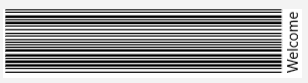
The code snippet below can be used to set the direction of barcodes by using the **BarDirection** property:
**xml**
```xml
```
**csharp**
```csharp
barCode.BarDirection=BarCodeDirection.BottomToTop;
```
## BarHeight
You can specify the height of a barcode in screen pixels by using the [BarHeight](/componentone/api/winui/online-winui/dotnet-api/C1.WinUI.BarCode/C1.WinUI.BarCode.C1BarCode.BarHeight.html) property of the **C1BarCode** class. If the bar height exceeds the height of the control, this property is ignored. The following image shows height of bars on setting BarHeight to 10 in XAML and C# view:
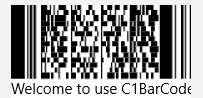
The code snippet below can be used to set the height of barcodes by using the **BarHeight** property:
**xml**
```xml
```
**csharp**
```csharp
barCode.BarHeight=10;
```
## WholeSize
You can specify the size of the overall barcode by using the [WholeHeight](/componentone/api/winui/online-winui/dotnet-api/C1.WinUI.BarCode/C1.BarCode.WholeSize.WholeHeight.html) and [WholeWidth](/componentone/api/winui/online-winui/dotnet-api/C1.WinUI.BarCode/C1.BarCode.WholeSize.WholeWidth.html) properties of the [C1.BarCode.WholeSize](/componentone/api/winui/online-winui/dotnet-api/C1.WinUI.BarCode/C1.BarCode.WholeSize.html) class. The **WholeHeight** represents the height and **WholeWidth** represents the width of the overall barcode.
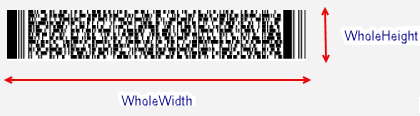
The code snippet below can be used to set the overall size of the barcode by using the **WholeHeight** and **WholeWidth** properties:
```csharp
barcode.WholeSize.WholeHeight=100;
barcode.WholeSize.WholeWidth=100;
```
## FixLength
The [FixLength](/componentone/api/winui/online-winui/dotnet-api/C1.WinUI.BarCode/C1.WinUI.BarCode.C1BarCode.FixLength.html) property of the **C1BarCode** class lets you specify the fixed number of digits of values of the barcode.
The code snippet below shows setting the **FixLength** property of BarCode control to a value 10:
**xml**
```xml
```
**csharp**
```csharp
barCode.FixLength=10;
```
## AutoSize
The [AutoSize](/componentone/api/winui/online-winui/dotnet-api/C1.WinUI.BarCode/C1.WinUI.BarCode.C1BarCode.AutoSize.html) property of the **C1BarCode** class lets you specify whether the barcode should stretch to fit the control or not. It takes the boolean value i.e. either **True** or **False**. The code snippet below can be used to set the **AutoSize** property of BarCode control to **True** so that it can stretch automatically:
**xml**
```xml
```
**csharp**
```csharp
barCode.AutoSize=true;
```