# Using ComponentOne Template
## Content
**ComponentOne WinUI Edition** provides predefined project templates to create and configure WinUI applications in Visual Studio. These project templates get registered in Visual Studio after the ComponentOne Studio installer is run to install **WinUI Edition**. ComponentOne project template provides several benefits over Visual Studio templates as it automatically adds the required resources to the project as listed below:
* Adds required WinUI Edition references to the project.
* Registers all the ComponentOne WinUI controls to the project.
* Adds a sample to see the related control or component in action.
Complete the following steps to create a WinUI project in Visual Studio using ComponentOne project templates and use the ComponentOne WinUI controls. First, you need to make sure to check the [System Requirements](/componentone/docs/winui/online-winui/get-started-winui#requirements) before proceeding.
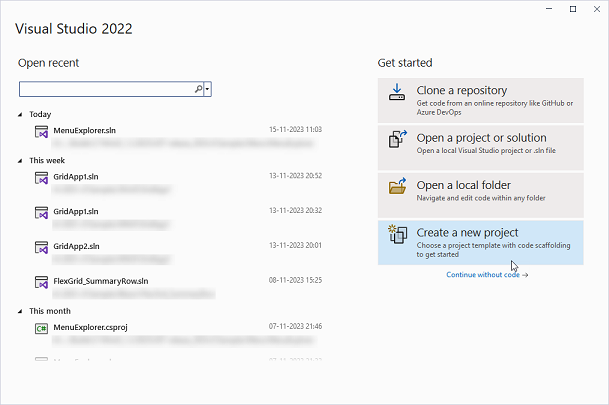
1. Open **Visual Studio** and select **Create a new project** from the **Get started** pane.
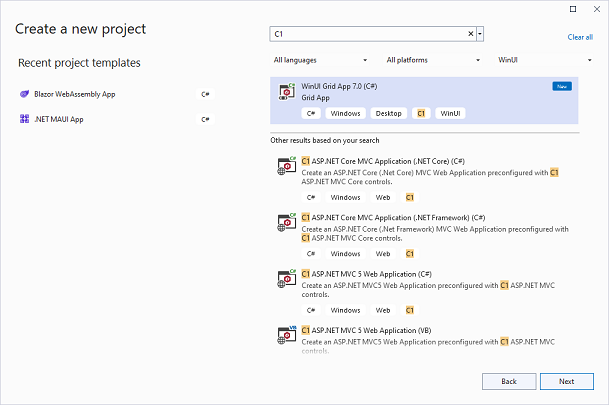
2. In the **Create a new project** window, type C1 in the search bar to get the list of all the installed C1 templates and select WinUI from the project drop-down.
3. Select the **WinUI Grid App 7.0 (C#)** project type and click **Next**.
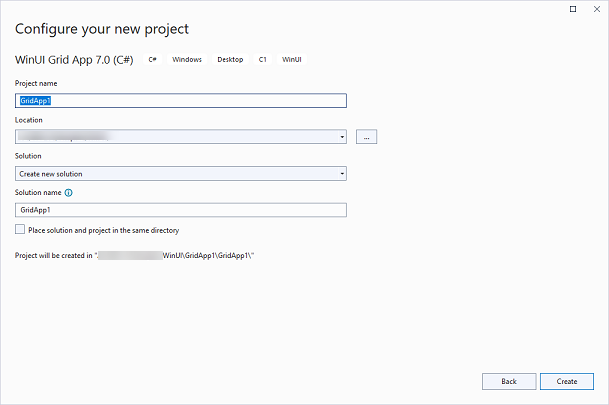
4. In the **Configure your new project** window, provide name of the project you want to create in the **Project name** field, say Winui\_App, and location for the project in the **Location** field. We have kept the default Project name, GridApp1. Then, click **Create**.
Observe that a new .NET WinUI app is created with the following dependencies.
* C1.WinUI.Accordion
* C1.WinUI.BarCode
* C1.WinUI.Calendar
* C1.WinUI.Core
* C1.WinUI.DataFilter
* C1.WinUI.DataPager
* C1.WinUI.DateTimeEditor
* C1.WinUI.Grid
* C1.WinUI.GridControl
* C1.WinUI.Input
* C1.WinUI.Menu
* C1.WinUI.Rendering