# Thumbnail Elements
## Content
Taskbar button thumbnails, which are represented by the [C1Thumbnail](/componentone/api/win/online-winpack/dotnet-framework-api/C1.Win.C1Win7Pack.4.8/C1.Win.C1Win7Pack.C1Thumbnail.html) class, can consist of two elements: a live preview of the application and a toolbar.
### Thumbnail Preview
As long as the user has the thumbnail preview feature activated in Windows 7, a live preview of the entire application window will appear in the thumbnail preview.
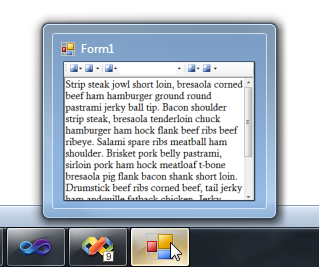
If you want users to only see a portion of the application, you can restrict the preview to a portion of the application by setting the [ClipControl](/componentone/api/win/online-winpack/dotnet-framework-api/C1.Win.C1Win7Pack.4.8/C1.Win.C1Win7Pack.C1Thumbnail.ClipControl.html) property. For example, you could restrict the preview to display only an application's rich text editor by setting the ClipControl property to the ID of a **RichTextBox** control.
### Thumbnail Toolbar
One of the most convenient additions to the Windows 7 UI was the thumbnail toolbar. These toolbars have cut down on the need for time-wasting application switching. For example, the Windows Media Player now contains Previous, Next, and Play/Pause buttons so that you can switch your music without cluttering your desktop with another window. In the sample image below, you can see a toolbar at the bottom of the thumbnail.
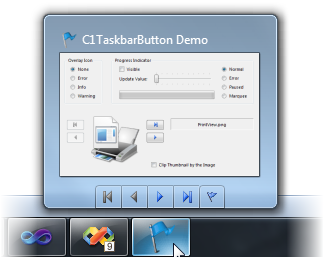
A **Windows 7 Pack for WinForms** thumbnail button is represented by the [C1ThumbButton](/componentone/api/win/online-winpack/dotnet-framework-api/C1.Win.C1Win7Pack.4.8/C1.Win.C1Win7Pack.C1ThumbButton.html) class.
You can add an icon to a C1ThumbButton via the [Icon](/componentone/api/win/online-winpack/dotnet-framework-api/C1.Win.C1Win7Pack.4.8/C1.Win.C1Win7Pack.C1ThumbButton.Icon.html) property. By default, each button will have a button border, but you can turn this off by setting the [NoBackground](/componentone/api/win/online-winpack/dotnet-framework-api/C1.Win.C1Win7Pack.4.8/C1.Win.C1Win7Pack.C1ThumbButton.NoBackground.html) property to **True**.