# Three-Dimensional vs. Flat Display
## Content
**True DBGrid for WinForms** supports a standard, "flat" control appearance, the more attractive three-dimensional appearance used by many controls, and a third that combines the flat appearance with the 3D. By default, the grid's [FlatStyle](/componentone/docs/win/online-truedbgrid/) property is set to [FlatModeEnum](/componentone/docs/win/online-truedbgrid/).**Standard** so that the 3-D look is used. However, this property only controls whether 3D effects are used to draw the grid's border, caption bars, column headings and footings, and the record selector column. It does not affect the grid's data cells or row and column dividers. The following settings are available:
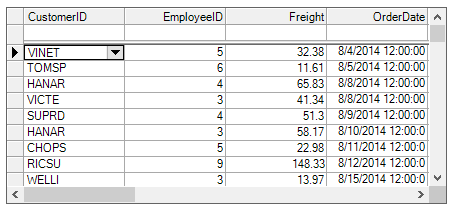
* When FlatStyle is set to FlatModeEnum.**Standard**, the grid looks like this:
* When FlatStyle is set to FlatModeEnum.**PopUp**, the grid looks like this:
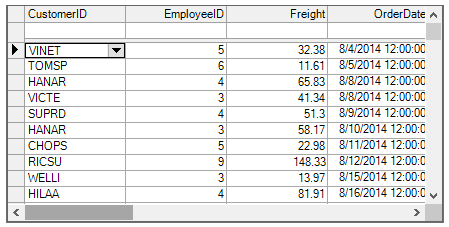
Note that the initial grid has the same in appearance as FlatModeEnum.**Flat**. As the mouse moves over any control element, the appearance of that element takes on a 3D look.
* When FlatStyle is set to FlatModeEnum.**Flat**, the grid looks like this:
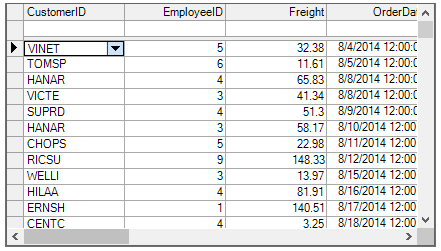
To achieve a 3D appearance for the entire grid, including its interior, set the following properties either in the designer or in code:
1. In the Properties window, set the [RowDivider](/componentone/docs/win/online-truedbgrid/) style property to **Raised**.
2. In the Splits Collection editor, set the [Style](/componentone/docs/win/online-truedbgrid/) property to [LineStyleEnum.Raised](/componentone/docs/win/online-truedbgrid/) for **all** [ColumnDivider](/componentone/docs/win/online-truedbgrid/) style objects for each split.
3. In the Properties window, set the **BackColor** property of the Normal style to **Lavender**.
The resulting grid will look something like this:
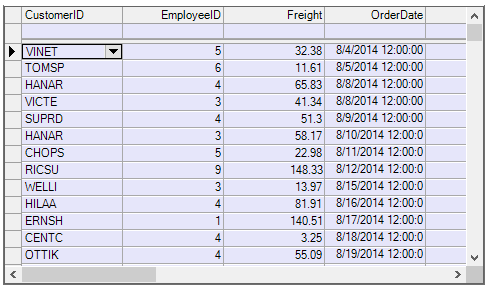
Note that changing the **Style** property of the RowDivider object to **Raised** consumes an extra vertical pixel in each data row, resulting in fewer visible rows.