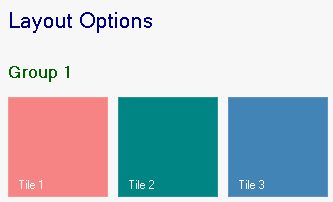
# Setting Text for the TileControl and Group
## Content
The TileControls text and its font size and color as well as the groups text, font size, and color can be applied to the TileControl and group programmatically or at design time.
To modify the TileControl and Group text, complete the following:
1. Right-click the **C1TileControl** and select **Properties**. The C1TileControl properties pane appears.
2. Enter the text inside the **Text** texbox that you wish to appear on the C1TileControl, for example **Layout Options**.
3. Set the **ForeColor** property to **Navy**. Note that this sets the groups forecolor as well. To change the groups forecolor it can be specified in the GroupForeColor property.
4. Set the **TextSize** property to **16**. This overrides the **Font.Size** property.
5. Expand the **Groups** node in the C1TileControls properties pane.
6. Set the **GroupFont** to **True** so the groups font appears bold.
7. Set the **GroupForeColor** to **DarkGreen**.
**This topic illustrates the following**:
The C1TileControl and Groups Text is modified.