# Creating a CheckMark for the Tile
## Content
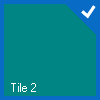
A checkmark can be displayed it the upper right corner of the tile by setting the [Checked](/componentone/docs/win/online-tilecontrol/) property to True.
### Design-Time
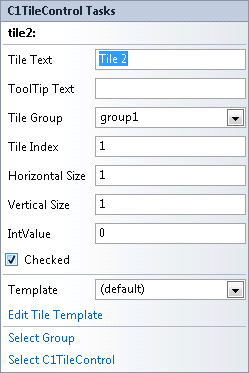
1. To apply a checkmark to a specific tile, select **tile2** and check the checkbox next to the Checked property.
2. Right-click the **C1TileControl** and select **Properties**.
3. Under the **Appearance** node set the [CheckMarkColor](/componentone/docs/win/online-tilecontrol/) property to **Silver**.
**This topic illustrates the following**:
A checkmark appears in the upper right corner of tile2.
## See Also
[Increasing the Size of a Specific Tile](/componentone/docs/win/online-tilecontrol/tilecontrolforwinformstaskbasedhelp/creatingacheckmarkforthetile/increasingthesizeofaspecifictile)