# Adding Tiles to a Specific Group
## Content
Tiles can be created at design time or programmatically. At design time they can be created using the **C1TileControl.Groups Collection Editor** and **Group.Tiles Collection Editor**. Tiles can also be created programmatically through the [Tile](/componentone/docs/win/online-tilecontrol/) class. The tiles can be inserted into the TilesCollection at the specified index using the [InsertItem](/componentone/docs/win/online-tilecontrol/) method. You can then add the tiles to the appropriate group using the Group.Tiles property.
### Design-Time
To add a template at design time, complete the following:
1. Right-click the **C1TileControl** and select **Edit Groups** to open the **C1TileControl.Groups Collection Editor**.
2. Select the Group from the members list where you want to add the tiles, for example **Group2**.
3. Click on the ellipsis button next to **Tiles** collection property.
4. Click add three times to add three **Tiles** to the second group, **group2**.
5. Click **OK** to save and close the **Group.Tiles Collection Editor** and click **OK** to save and close the **C1TileControl.Groups Collection Editor**.
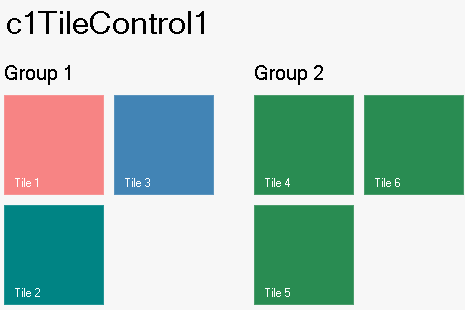
**This topic illustrates the following**:
The three Tiles appear horizontally by default and they all have the same default dark green color: