# Tile Tasks
## Content
To access the **C1TileControl Tasks** menu, click any of the tiles in the **C1TileControl** control. This will open the **C1TileControl Tasks** menu.
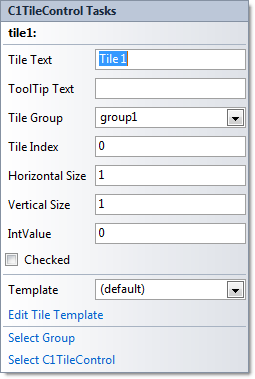
The **C1TileControl Tasks** menu operates as follows:
### Tile Text
Clicking in the textbox next to the **Tile Text** item will create text that appears on the top of the **Tile** in the [C1TileControl](/componentone/docs/win/online-tilecontrol/).
### ToolTip Text
Clicking in the textbox next to the **ToolTip Text** item will create text that appears when you hover over the text in the **Tile** of the [C1TileControl](/componentone/docs/win/online-tilecontrol/).
### Tile Group
Clicking the dropdown arrow will show a menu that lists the existing groups. Select the group that you wish the tile to be in.
### Tile Index
Specifies the position of the Tile within the group.
### Horizontal Size
Specifies the horizontal size of the **Tile**.
### Vertical Size
Specifies the vertical size of the **Tile**.
### IntValue
Specifies the integer value of the **Tile**.
### Checked
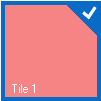
Clicking on the checkbox will enable the checkmark so the Tile will have a checkmark on it that appears like the following:
### Edit Tile Template
Clicking the **Edit Tile Template** item opens the **Template.Elements Collection Editor** where you can add text, image, and panels to the templates in the **Tiles**.
### Select Group
Clicking the **Select Group** item selects the Group where the Tile is located within.
### Select C1TileControl
Clicking the **Select C1TileControl** item selects the C1TileControl.