# C1ThemePicker Design Time Support
This topic covers design time support in themepicker control.
## Content
The user can customize the properties of the **C1ThemePicker** control such as its BackColor, ForeColor, Location, DropDownWidth etc. using the **Properties** window. You can access the **C1ThemePicker Tasks** menu by clicking the smart tag in the upper-right corner of the C1ThemePicker control.
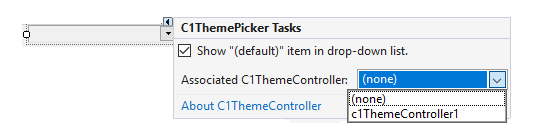
The **C1ThemePicker** **Tasks** menu can perform the following operations:
* **Show "(default)" item in the dropdown list**
The user can select the checkbox to display the "default" theme in the drop-down list.
* **Associated C1ThemeController**
The user can set the associated C1ThemeController to apply the selected theme.
* **About C1ThemePicker**
The user can click this option and view a dialog box that displays the version number of C1ThemePicker and other online resources.