# SuperTooltip Elements
In this topic, you will get info about elements in supertooltip control.
## Content
The C1SuperTooltip control consists of several elements that can be modified through the **Office** tab of the **C1SuperTooltip Editor**. For more information about the **C1SuperTooltip Editor** and these elements, please see the [Office tab](/componentone/docs/win/online-supertooltip/designtimesupport/editor) topic.
> type=note
> **Note**: If you choose to add HTML code directly to the C1SuperTooltip or add a C1SuperTooltip programmatically, elements will not be automatically added and must be formatted manually through the HTML code (for example adding a separator by adding the \
horizontal rule tag).
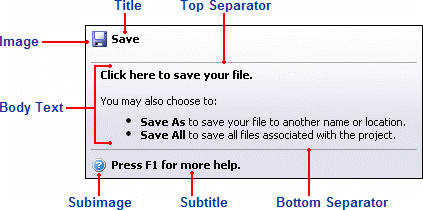
### Title
This is the text that appears at the top of the ToolTip; you can add HTML code to customize the appearance of the title text.
### Image
This is the image that appears to the left of the Title. You can add an image through the **C1SuperTooltip Editor** or you can add an image to the collection by using the **Edit Image Collection Editor**.
### Top Separator
The top separator is a horizontal rule that appears between the ToolTip's title and the body text. You can add a top separator through the **Office** tab of the **C1SuperTooltip Editor** or you can add a horizontal rule to the HTML code by using the \
tag.
### Body Text
The body text is the main content of the ToolTip; you can add HTML to customize the appearance of the body text.
### Bottom Separator
The bottom separator is a horizontal rule that appears between the ToolTip's body text and subtitle. You can add a bottom separator through the **Office** tab of the **C1SuperTooltip Editor** or you can add a horizontal rule to the HTML code by using the \
tag.
### Subtitle
This is text that appears below the ToolTip's body text; you can add HTML code to customize the appearance of the subtitle text.
### Subimage
This is the image that appears to the left of the subimage. You can add an image through the **C1SuperTooltip Editor** or you can add an image to the collection by using the **Edit Image Collection Editor**.
For more information about creating a ToolTip using the **Office** tab, see the [Creating C1SuperTooltips at Design Time](/componentone/docs/win/online-supertooltip/designtimesupport) topic.