# SuperLabel Elements
In this topic, you will get info about elements in superlabel control.
## Content
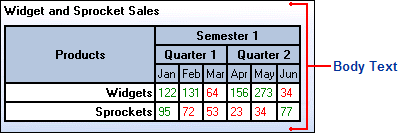
The C1SuperLabel control consists of a main body in which HTML content can be added. In the following example, a table was added to the label using HTML. For more information, see the [Creating C1SuperLabels](/componentone/docs/win/online-supertooltip/work-with-superlabel) topic.
You can also quickly add and preview content using the **C1SuperLabel Editor**. For more information about the editor, see the [C1SuperLabel Editor](/componentone/docs/win/online-supertooltip/designtimesupport) topic.