# Creating a Vertical Split
## Content
Creating a vertical split is as simple as setting one property. In this topic, you'll learn how to set the [Dock](/componentone/docs/win/online-splitcontainer/) property in design view and in code view.
For more information on vertical splits, see [Vertical Split](/componentone/docs/win/online-splitcontainer/splitcontainerlayout/splitcontainerlayout1/verticalsplit).
### In Design View:
Complete the following steps:
1\. Add the [C1SplitContainer](/componentone/docs/win/online-splitcontainer/) to the form.
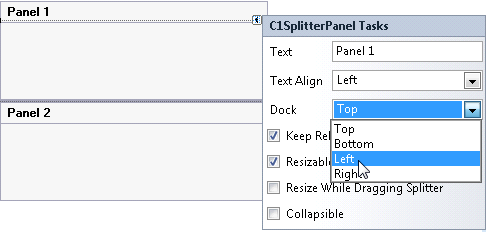
2\. Click on the C1SplitContainer’s smart tag to open its tasks menu\.
3\. Select **Add Panel** once to add another panel to the **C1SplitContainer** control. A new panel is added below and the panel’s appear horizontal, by default.
4\. Select **Panel 1** and set its Dock property to **Left** so it moves the panel to the left side and moves the splitter bar vertically.
### In Code View:
Complete the following steps:
1. Add the **C1.Win.C1SplitContainer.dll** reference to your project.
2. Declare the following **C1.Win.C1SplitContainer** namespace at the top of your code page:
```vbnet
Imports C1.Win.C1SplitContainer
```
```csharp
using C1.Win.C1SplitContainer
```
3. Add the following code in the **Form\_Load** event:
```vbnet
Private Sub Form1_Load(sender As Object, e As EventArgs)
'create new splitcontainer
Dim split As New C1SplitContainer()
'create a new panel for the split container
Dim panel1 As New C1SplitterPanel()
Dim panel2 As New C1SplitterPanel()
'add the panels to the splitcontainer
split.Panels.Add(panel1)
split.Panels.Add(panel2)
panel1.Text = "Panel 1"
panel2.Text = "Panel 2"
'dock panel 1 to the left
panel1.Dock = DockStyle.Left
'add the splitcontainer
Controls.Add(split)
End Sub
```
```csharp
private void Form1_Load(object sender, EventArgs e)
{
//create new splitcontainer
C1SplitContainer split = new C1SplitContainer();
//create a new panel for the split container
C1SplitterPanel panel1 = new C1SplitterPanel();
C1SplitterPanel panel2 = new C1SplitterPanel();
//add panel1 to the splitcontainer
split.Panels.Add(panel1);
split.Panels.Add(panel2);
panel1.Text = "Panel 1";
panel2.Text = "Panel 2";
//dock panel 1 to the left
Panel1.Dock = DockStyle.Left;
//add the splitcontainer
Controls.Add(split);
}
```
4. Run the program.
**This Topic Illustrates the Following**:
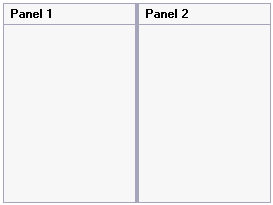
The splitter bar is now vertical. The final result of this topic will resemble the following image:
## See Also
[Creating a Nested Split](/componentone/docs/win/online-splitcontainer/splitcontainerforwin3/creatingdifferentspl/creatinganestedsplit)