# Changing the Visual Style
## Content
C1SplitContainer features eight embedded visual styles that you can apply to the control with just a few clicks. This topic illustrates how to change the control's visual style in Design view, Source view, and in code.
For more information on visual styles, see [SplitContainer Visual Styles](/componentone/docs/win/online-splitcontainer/splitcontainerappear/splitcontainervisual).
### In Design View:
Complete the following steps:
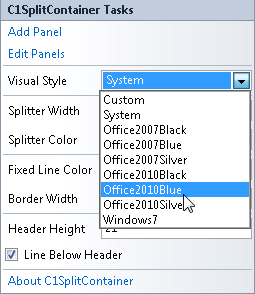
1. Click **C1SplitContainer**'s smart tag to open the **C1SplitContainer Tasks** menu.
2. Click the VisualStyle drop-down arrow and then select a visual style from the list. For this example, choose **Office2010Blue**.
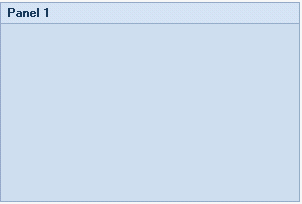
The **C1SplitContainer** control adopts the **Office2010Blue** visual style.
### In Code View:
Complete the following steps:
1. Add the **C1.Win.C1SplitContainer.dll** reference to your project.
2. Declare the following **C1.Win.C1SplitContainer** namespace at the top of your code page:
Visual Basic
```vbnet
Imports C1.Win.C1SplitContainer
```
To write code in C#
```csharp
using C1.Win.C1SplitContainer;
```
3\. Add the following code in the **Form\_Load** event:
Visual Basic
```vbnet
Private Sub Form1_Load(sender As Object, e As EventArgs)
'create new splitcontainer
Dim split As New C1SplitContainer()
'set splitcontainer visual style to office2010blue
split.VisualStyle = VisualStyle.Office2010Blue
'add the splitcontainer
Controls.Add(split)
End Sub
```
To write code in C#
```csharp
private void Form1_Load(object sender, EventArgs e)
{
//create new splitcontainer
C1SplitContainer split = new C1SplitContainer();
//set splitcontainer visual style to office2010blue
split.VisualStyle = VisualStyle.Office2010Blue
//add the splitcontainer
Controls.Add(split);
}
```
4\. Run the program\.
**This Topic Illustrates the Following**:
The following image shows a **C1SplitContainer** with the **Office2010Blue** visual scheme:
## See Also
[Changing the Splitter Width](/componentone/docs/win/online-splitcontainer/splitcontainerforwin3/changingthec1splitco/changingthesplitterw)