# Step 3 of 4: Creating Collapsible Panels
## Content
In this step you will modify a few common elements of the C1SplitContainer control to change its appearance as well as create collapsible panels.
Complete the following steps:
1. Select C1SplitContainer2 Panel1’s smart tag and check collapsible.
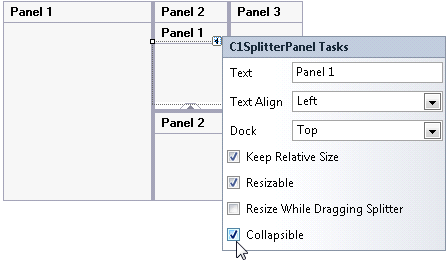
The expander button appears and now you will be able to expand or collapse the panels of Panel 2 at run time.
2. Select **C1SplitContainer1** to reveal its list of properties and then complete the following:
* Set the **C1SplitContainer1.BackColor** property to **LightSteelBlue**.
* Set the **C1SplitContainer1.FixedLineColor** property to **BlanchedAlmond**.
* Set the **C1SplitContainer1.HeaderBackColor** property to **Navy**.
* Set the **C1SplitContainer1.HeaderForeColor** property to **White**.
* Set the **C1SplitContainer1.SplitterColor** property to **BlanchedAlmond**.
For more information see [SplitContainer Appearance Properties](/componentone/docs/win/online-splitcontainer/splitcontainerappear/splitcontainerappear1).
3. Set the **C1SplitContainer1.Dock** property to **Fill.**
4. Select C1SplitContainer1 and click Edit Panels from its tasks menu.
5. In the Members list select the c1SplitterPanel2 [Panel 2\] and delete the default, “Panel 2” text from the [Text](/componentone/docs/win/online-splitcontainer/) property.
This removes the panel header from the C1SplitContainer.
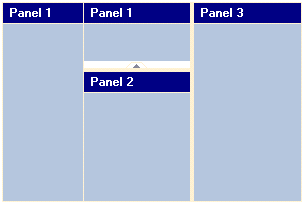
The appearance settings will be updated at design time, and your control will resemble the following image:
In the next step, you'll control the sizing for the C1SplitterPanels.
## See Also
[Step 4 of 4: Sizing the C1SplitContainer Control](/componentone/docs/win/online-splitcontainer/splitcontainerforwin1/step4of4sizingthec1splitcontainercontrol1)