# Dialog Box
## Content
Spelling dialog box is available whenever a spelling error has been detected by the spell checker. It allow users to add, change or ignore the spelling suggestions for a word.
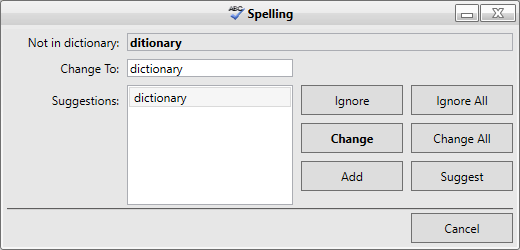
To enable the **Spell Dialog**, use the CheckControl method to link the **SpellChecker** component to a control derived from Windows.Forms.TextBoxBase. For example, the following code links the **C1SpellChecker** component to a RichTextBox control:
```csharp
private void btnSpellCheck_Click(object sender, EventArgs e)
{
c1SpellChecker1.CheckControl(richTextBox1);
}
```
```vbnet
Private Sub btnSpellCheck_Click(ByVal sender As System.Object, ByVal e As System.EventArgs) Handles btnSpellCheck.Click
C1SpellChecker1.CheckControl(RichTextBox1)
End Sub
```
While spell checking, the **C1SpellChecker** will automatically highlight misspelled words when the user interacts with the built-in **Spell Dialog**.
### Custom Spelling **Dialog**
The **Spell Dialog** can be customized three different ways:
1. Create an instance of the [C1SpellDialog](/componentone/docs/win/online-spellchecker/) class, attach event handlers, then pass the instance of the dialog to the [CheckControl](/componentone/docs/win/online-spellchecker/) method. For example:
```csharp
private void btnSpell_Click(object sender, EventArgs e)
{
// Create a spell-checking dialog box
using (C1SpellDialog dlg = new C1SpellDialog())
{
// Connect event
dlg.ErrorDisplayed += new EventHandler(dlg_ErrorDisplayed);
// Spell-check the RichTextBox
c1SpellChecker1.CheckControl(this.richTextBox, false, dlg);
}
}
void dlg_ErrorDisplayed(object sender, EventArgs e)
{
// Get the C1SpellDialog that fired the event
C1SpellDialog dlg = sender as C1SpellDialog;
// Show information about the error currently displayed
toolStripStatusLabel1.Text = string.Format("Error {0} of {1}: '{2}'",
dlg.ErrorIndex + 1, dlg.ErrorCount, dlg.CurrentError.Text);
}
```
```vbnet
Private Sub btnSpell_Click(ByVal sender As System.Object, ByVal e As System.EventArgs) Handles btnSpell.Click
' Create a spell-checking dialog box
Using dlg As New C1SpellDialog()
' Connect event handler
AddHandler dlg.ErrorDisplayed, AddressOf dlg_ErrorDisplayed
' spell-check the RichTextBox control
C1SpellChecker1.CheckControl(Me.RichTextBox, False, dlg)
End Using
End Sub
Private Sub dlg_ErrorDisplayed(ByVal sender As Object, ByVal e As EventArgs)
' Get the C1SpellDialog that fired the event
Dim dlg As C1SpellDialog = TryCast(sender, C1SpellDialog)
' Show information about the error currently displayed
ToolStripStatusLabel1.Text = String.Format("Error {0} of {1}: '{2}'", dlg.ErrorIndex + 1, dlg.ErrorCount, dlg.CurrentError.Text)
End Sub
```
Note that the code above assumes that you have added a **Button** control and a **StatusStrip** control with a **ToolStripStatusLabel** to your form at design time.
OR
2. Create a new spell-checking dialog class that implements the ISpellDialog interface. Then pass an instance of the new dialog to the CheckControl method.
OR
3. If you need more extensive customization, you can create your own spell dialog box and use that instead of the built-in one.
>type=note
> **Note**: The samples that ship with the **C1SpellChecker** include a **CustomSpellDialog** application that includes the source code for two dialogs that you can use as a base for creating your own spell dialog boxes.