# Selecting Characters in the C1Editor
Learn how to specify the first character to select in range with the help of SelectionStart property and specify how many characters to be selected with SelectionLength property.
## Content
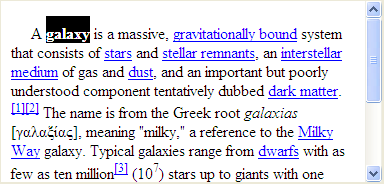
You can use the [SelectionStart](/componentone/api/win/online-richtexteditor/dotnet-framework-api/C1.Win.C1Editor.4.8/C1.Win.C1Editor.C1Editor.SelectionStart.html) property to specify the first character to select in the range. Use the [SelectionLength](/componentone/api/win/online-richtexteditor/dotnet-framework-api/C1.Win.C1Editor.4.8/C1.Win.C1Editor.C1Editor.SelectionLength.html) property to specify how many characters should be selected.
DOC-DETAILS-TAG-OPEN
DOC-SUMMARY-TAG-OPEN
To write code in C#
DOC-SUMMARY-TAG-CLOSE
```csharp
private void button1_Click(object sender, EventArgs e)
{
C1Editor1.SelectionStart = 2;
C1Editor1.SelectionLength = 6;
}
```
DOC-DETAILS-TAG-CLOSE
For example, the following code starts the selection after the second character in the [C1Editor](/componentone/api/win/online-richtexteditor/dotnet-framework-api/C1.Win.C1Editor.4.8/C1.Win.C1Editor.C1Editor.html) and continues until six characters are selected:
> type=note
> **Note**: The [Select](/componentone/api/win/online-richtexteditor/dotnet-framework-api/C1.Win.C1Editor.4.8/C1.Win.C1Editor.C1Editor.Select.html) method of **C1Editor** class can be used as an alternate method to select the text.