# Style Formatting Dialog Box
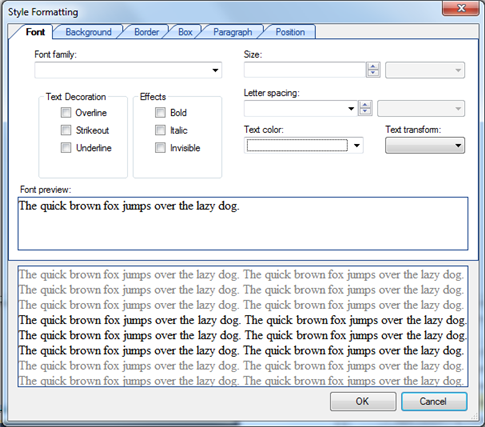
C1Editor for WinForms provides Style Formatting Dialog Box that allows users to style the documents and texts.
## Content
The **Style Formatting** dialog box can be accessed by right-clicking text in the editor and selecting **Formatting** or by clicking the **Edit** button in the Style section of the following dialog boxes: **Bookmark**, **Movie in Flash Format Properties**, **Hyperlink**, **Picture**, **Table**, **Row** **Properties**, **Column** **Properties**, and **Cell** **Properties**.
The **Style** **Formatting** dialog box consists of six tabs: **Font**, **Background**, **Border**, **Box, Paragraph, and Position**. Note that not all tabs are available for each of the dialog boxes.
## See Also
[Font Tab](/componentone/docs/win/online-richtexteditor/c1editorruntimeeleme/c1editordialogboxes/styleformattingdialo/fonttab)
[Background Tab](/componentone/docs/win/online-richtexteditor/c1editorruntimeeleme/c1editordialogboxes/styleformattingdialo/backgroundtab)
[Border Tab](/componentone/docs/win/online-richtexteditor/c1editorruntimeeleme/c1editordialogboxes/styleformattingdialo/bordertab)
[Box Tab](/componentone/docs/win/online-richtexteditor/c1editorruntimeeleme/c1editordialogboxes/styleformattingdialo/boxtab)
[Paragraph Tab](/componentone/docs/win/online-richtexteditor/c1editorruntimeeleme/c1editordialogboxes/styleformattingdialo/paragraphtab)
[Position Tab](/componentone/docs/win/online-richtexteditor/c1editorruntimeeleme/c1editordialogboxes/styleformattingdialo/positiontab)