# Page Setup Dialog Box
C1Editor control provides Page Setup Dialog Box that allows users to set the basic page properties, margins, header and footer properties.
## Content
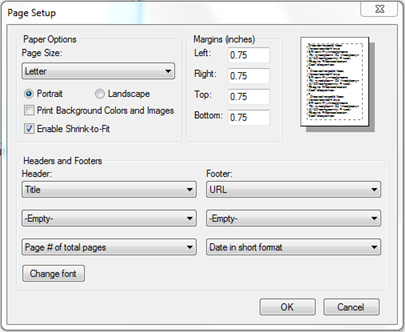
In the **Page Setup** dialog box, users can specify the page size and orientation, set page margins, and create headers and footers.
### Paper Options
| **Page Size** | Click the drop-down arrow and select a paper size. |
| --- | --- |
| **Portrait** or **Landscape** | Select **Portrait** or **Landscape** to determine the page orientation. |
| **Print Background Colors and Images** | Select this checkbox to print background colors and pictures. |
| **Enable Shrink-to-Fit** | Select this checkbox to scale the content to fit on the page. |
### Margins
Specify the page margins in the **Left**, **Right**, **Top**, and **Bottom** boxes.
### Headers and Footers
Click the drop-down arrows under **Header** or **Footer** to select the header or footer to be inserted, or create your own custom header or footer. Click the **Change Font** button to change the header or footer font, style, and size.