# Movie in Flash Format Properties Dialog Box
Learn how you can insert a Flash movie in a document and set the window size and play options using the Movie in Flash Format Properties Dialog Box.
## Content
In the **Movie in Flash Format Properties** dialog box, users can specify the Flash movie to be inserted in the document as well as set the window size and play options.
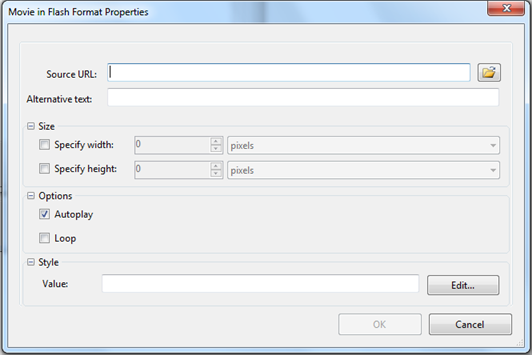
| **Source URL** | Click the **Browse** button to locate a Flash movie. |
| --- | --- |
| **Alternative text** | Enter the text that should appear in case the movie is unavailable. |
### Size
| **Specify width** | Select this checkbox and enter a number to specify the movie window width. Choose pixels or percent. |
| --- | --- |
| **Specify height** | Select this checkbox and enter a number to specify the movie window height. Choose pixels or percent. |
### Options
| **Autoplay** | Select this check box to automatically start the movie when the document is loaded. |
| --- | --- |
| **Loop** | Select this check box to continuously play the movie. |