# Hyperlink Properties Dialog Box
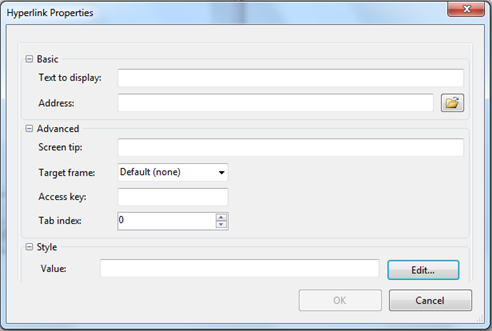
C1Editor control provides Hyperlink Properties Dialog Box that allows you to enter a URL, specify the text to display, add a tooltip, specify the frame for the web page and create an access key.
## Content
In the **Hyperlink Properties** dialog box, users can enter a URL, specify the text to display, add a tooltip, specify the frame where the Web page will open, create an access key, and enter a tab index.
### Basic
| **Text to display** | Enter the text that will appear as a hyperlink in the document. |
| --- | --- |
| **Address** | Enter the URL address for the hyperlink. |
### Advanced
| **Screen tip** | Enter the tooltip text that will appear when a user hovers over the hyperlink. |
| --- | --- |
| **Target frame** | Click the drop-down arrow to select a frame where the web page will appear when the hyperlink is clicked. |
| **Access key** | Enter a key that can be pressed with the ALT key to jump to a specific control on the page without using the mouse. |
| **Tab index** | Enter a number to define the tab order for the hyperlink. |