# Ribbon Tab
This topic covers details about the ribbon tab in C1Ribbon.
## Content
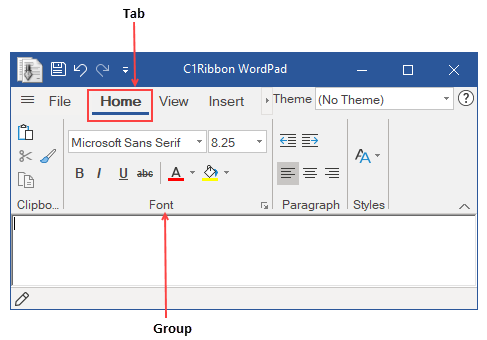
A user may require many commands in an application in order to work with different scenarios. The commands are usually grouped and put under different **Ribbon Tabs**. A Ribbon tab can contain many groups. Each Group comprises a set of Items. For instance, in the Office application, the Home tab in the Ribbon is used to perform many common operations like changing fonts, applying styles, changing formats, editing texts (copy, cut and paste) etc. The Home tab contains many groups such as Clipboard, Font, Paragraph and Styles.
### Adding Ribbon Tab via Designer
A user can add **Tabs** from the **C1Ribbon** floating toolbar. For more information, see the [Using Floating ToolBars](/componentone/docs/win/online-ribbon/concepts/designtimesupport/floatingtoolbar) topic. A Ribbon tab can also be added using **RibbonTab Collection Editor** from the **Properties** window of **C1Ribbon** or **Contextual Tab Group** by clicking on the ellipsis next to the **Tabs** property. For more information about Collection Editors, refer this [topic](/componentone/docs/win/online-ribbon/concepts/designtimesupport/collectioneditors).
### Adding Ribbon Tab via Code
Further, the user can add Tabs in the Ribbon through code with the RibbonTab class and Tabs property of C1Ribbon class.
```vbnet
' Create and add a new tab to the Ribbon control
Dim homeTab As New RibbonTab()
' Label the tab
homeTab.Text = "Home"
customRibbon.Tabs.Add(homeTab)
```
```csharp
// Create and add the "Home" tab
RibbonTab homeTab = new RibbonTab();
homeTab.Text = "Home";
customRibbon.Tabs.Add(homeTab);
```