# Wrapping Toolbar Buttons and Text
Get started with Menus and Toolbars for WinForms. Create versatile menus and docking/floating toolbars. See more in documentation here.
## Content
[C1ToolBar](/componentone/docs/win/online-menus-toolbar/designtimesupport/c1commandsmartdesign/smartdesignerfloatin/c1toolbartoolbar) provides wrapping ability for toolbar buttons as well as wrapping text in the toolbar buttons. The [Wrap](/componentone/api/win/online-menus-toolbar/dotnet-api/C1.Win.Command.10/C1.Win.Command.C1ToolBar.Wrap.html) property wraps the toolbar to another line so all of its toolbar buttons appear. By default, this property is enabled.
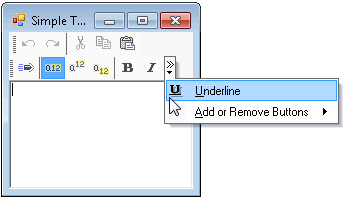
The following image shows how the toolbar buttons appear when its **Wrap** property set to **False**.
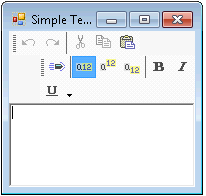
The following image shows how the toolbar buttons appear when its **Wrap** property set to **True**.
The following image shows how the toolbar buttons appear when its **Wrap** is set to **True** and its [WrapText](/componentone/api/win/online-menus-toolbar/dotnet-api/C1.Win.Command.10/C1.Win.Command.C1ToolBar.WrapText.html) properties is set to **False**.
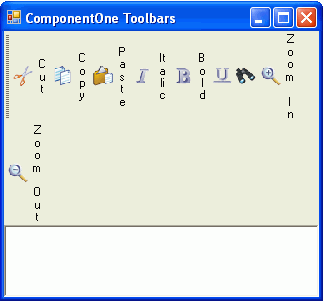
The following image shows how the toolbar buttons appear when their **Wrap** and **WrapText** properties are set to **True**.
## See Also
[ToolTips in Toolbars](/componentone/docs/win/online-menus-toolbar/menusandtoolbarsover/toolbarsappearancean/tooltipsintoolbars)