# ToolTips in Toolbars
Get started with Menus and Toolbars for WinForms. Create versatile menus and docking/floating toolbars. See more in documentation here.
## Content
A ToolTip is used to display text when the mouse hovers over the control. [C1ToolBar](/componentone/docs/win/online-menus-toolbar/) provides a [ShowToolTips](/componentone/docs/win/online-menus-toolbar/) property that displays the value of the [Text](/componentone/docs/win/online-menus-toolbar/) property as a ToolTip for each toolbar button. This property is enabled by default.
> type=note
> **Note**: If you have the **C1CommandLink.Text** property set for the button, but not its **C1Command.Text** property the ToolTip will get its default **C1Command.Text** name. For example, if it’s the first button the toolTip and **C1Command.Text** name would be Button1.
If you would like to enter custom text for the ToolTip of each toolbar button you can through the [ToolTipText](/componentone/docs/win/online-menus-toolbar/) property.
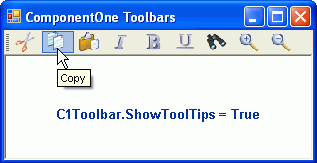
The following image depicts a toolbar that has its [ShowToolTips](/componentone/docs/win/online-menus-toolbar/) property set to **True**.
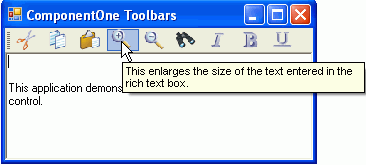
The following image shows a toolbar that has its [ShowToolTips](/componentone/docs/win/online-menus-toolbar/) property set to **True** and custom text entered for fourth [C1CommandLink](/componentone/docs/win/online-menus-toolbar/)'s [ToolTipText](/componentone/docs/win/online-menus-toolbar/) property.
For more information about using ToolTips, see [Displaying ToolTips for Menus and Toolbars](/componentone/docs/win/online-menus-toolbar/menusandtoolbarsforw2/menutasks/displayingtooltipsfo).
## See Also
[Toolbar and Button Layout Behavior](/componentone/docs/win/online-menus-toolbar/menusandtoolbarsover/toolbarsappearancean/toolbarandbuttonlayo)