# Adding an Arbitrary Control to the Toolbar
Get started with Menus and Toolbars for WinForms. Create versatile menus and docking/floating toolbars. See more in documentation here.
## Content
To add an arbitrary control to your toolbar, complete the following steps:
1. Add the [C1CommandDock](/componentone/docs/win/online-menus-toolbar/) control to your form.
2. Place the [C1ToolBar](/componentone/docs/win/online-menus-toolbar/) control onto the [C1CommandDock](/componentone/docs/win/online-menus-toolbar/) using a drag-and-drop operation.
3. Right-click on the [C1ToolBar](/componentone/docs/win/online-menus-toolbar/) located on your form. Select **Edit** from the context menu. The **Link to Command** designer appears. Set the following fields in the **Link to Command** designer:
* **Text** textbox to **Find text**:
* **Name** to **c1CommandControl1**
* Command Type to **C1CommandControl**
Press the **OK** button in the **Edit** dialog box.
4. Select the **C1CommandControl** from the Create a new command list box.
5. Select **c1CommandLink1** from the Properties drop-down list, then set the [ButtonLook](/componentone/docs/win/online-menus-toolbar/) property to **Text** . The toolbar button appears as text.
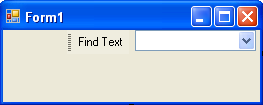
6. Select the Windows form tab and place the **ComboBox** control to the right side of the **C1ToolBar** using a drag-and-drop operation. The combo box appears like the following:
7. Select **c1CommandControl1** from the Properties drop-down list, then select the [Control](/componentone/docs/win/online-menus-toolbar/) property, and select **comboBox1** from its drop-down list.
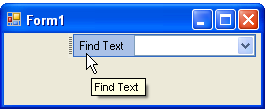
8. Build and run the application. Your toolbar will appear like this at run time:
## See Also
[Adding an Image to the Toolbar Button](/componentone/docs/win/online-menus-toolbar/menusandtoolbarsforw2/toolbartasks/addinganimagetotheto)