# Creating a Panel Header
Get started with Menus and Toolbars for WinForms. Create versatile menus and docking/floating toolbars. See more in documentation here.
## Content
In this topic, you will learn how to add a header to a panel using the smart tag and the floating toolbar.
### Using the Smart Tag
Complete the following steps:
1. Select the panel you would like to add the header to and click its smart tag (). The **C1NavBarPanel Tasks** menu opens.
2. From the **C1NavBarPanel Tasks** menu, select Add section header.
3. Select the header, **c1NavBarSectionHeader1,** and in the **Properties** window, set its **Text** property to a string. For this example, set it to “Hello World”.
### Using the Floating Toolbar
Complete the following steps:
1. Hover over the panel you wish to add the panel to until its floating toolbar appears. The floating toolbar will appear as follows:

The [C1NavBar](/componentone/docs/win/online-menus-toolbar/) control is added to the form. Observe that one page, named **Page 1**, appears on the control by default.
2. From the floating toolbar, select the **Add section header** button.

3. Select the header, **c1NavBarSectionHeader1** and, in the **Properties** window, set its **Text** property to a string. For this example, set it to “Hello World”.
### This topic illustrates the following:
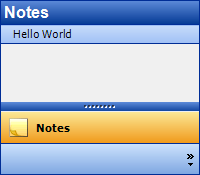
The result of this topic resembles the following:
## See Also
[Using Vertical Text for Collapsed Panels](/componentone/docs/win/online-menus-toolbar/menusandtoolbarsforw2/navbartasks/usingverticaltextfor)