# Creating a Window List for an MDI Form
Get started with Menus and Toolbars for WinForms. Create versatile menus and docking/floating toolbars. See more in documentation here.
## Content
[C1Command](/componentone/docs/win/online-menus-toolbar/) has a [C1CommandMdiList](/componentone/docs/win/online-menus-toolbar/) command type used to create a Window list for an MDI (Multiple Document Interface) form. A Window list is useful for keeping track of the various MDI child windows an application has open.
To create a Window list for an MDI form, complete the following steps:
1. In the Properties window, set the Form1.**IsMDIContainer** property to **True**.
2. In Solution Explorer, right-click the project and select **Add\|** **Add New Item**.
3. From the dialog box, select **Windows Form**, name the form **MdiChild**, and then set its **Text** property to **MdiChild**.
4. Add the [C1MainMenu](/componentone/docs/win/online-menus-toolbar/) component to your MDI parent form, **Form1**.
5. In the Properties window, set the **Name** property for the [C1MainMenu](/componentone/docs/win/online-menus-toolbar/) to **C1MainMenu1**.
6. Create the **File** menu. Add a [C1CommandMenu](/componentone/docs/win/online-menus-toolbar/) and a submenu item to the [C1MainMenu](/componentone/docs/win/online-menus-toolbar/) component using the **Link to Command** designer.
Set the following properties:
| Command Name | Command Type | Command Text |
| ------------ | ------------ | ------------ |
| cmdFile | C1CommandMenu | &File |
| cmdFileNew | C1Command | &New |
7. Create the **Window** menu to store the MDI child windows. In the **Link to Command** designer, add another [C1CommandMenu](/componentone/docs/win/online-menus-toolbar/) to the [C1MainMenu](/componentone/docs/win/online-menus-toolbar/) component, then add a submenu of the type [C1CommandMdiList](/componentone/docs/win/online-menus-toolbar/) to it.
Set the following properties:
| Command Name | Command Type | Command Text |
| ------------ | ------------ | ------------ |
| cmdWindow | C1CommandMenu | &Window |
| c1CommandMdiList1 | C1CommandMdiList | \ |
8. Create a procedure to display new instances of the **MdiChild** form as MDI children of **Form1**. Add the following code to your source file:
DOC-DETAILS-TAG-OPEN
DOC-SUMMARY-TAG-OPEN
To write code in Visual Basic
DOC-SUMMARY-TAG-CLOSE
```vbnet
Private Sub createNewMdiChild()
Dim mc As New MdiChild()
mc.MdiParent = Me
mc.Text = String.Format("MDI Child Window {0}", Me.MdiChildren.Length)
mc.Show()
End Sub
```
DOC-DETAILS-TAG-CLOSE
DOC-DETAILS-TAG-OPEN
DOC-SUMMARY-TAG-OPEN
To write code in C#
DOC-SUMMARY-TAG-CLOSE
```csharp
private void createNewMdiChild()
{
MdiChild mc = new MdiChild();
mc.MdiParent = this;
mc.Text = string.Format("MDI Child Window {0}", this.MdiChildren.Length);
mc.Show();
}
```
DOC-DETAILS-TAG-CLOSE
9. In Design view, double-click the **cmdFileNew** menu item to create a click event handler to call the **createNewMdiChild** procedure. Add the following code within the event handler:
DOC-DETAILS-TAG-OPEN
DOC-SUMMARY-TAG-OPEN
To write code in Visual Basic
DOC-SUMMARY-TAG-CLOSE
```vbnet
createNewMdiChild()
```
DOC-DETAILS-TAG-CLOSE
DOC-DETAILS-TAG-OPEN
DOC-SUMMARY-TAG-OPEN
To write code in C#
DOC-SUMMARY-TAG-CLOSE
```csharp
CreateNewMdiChild();
```
DOC-DETAILS-TAG-CLOSE
10. Press F5 to run the application.
11. From the **File** menu, click **New** to create a new MDI child form.
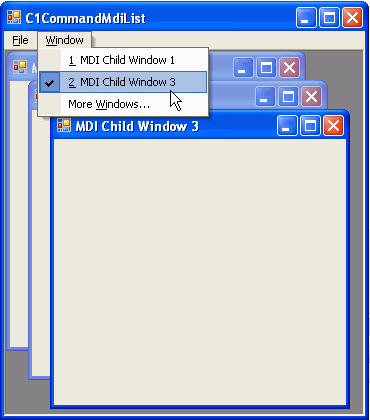
The [C1CommandMdiList](/componentone/api/win/online-menus-toolbar/dotnet-api/C1.Win.Command.10/C1.Win.Command.C1CommandMdiList.html) expands to the list of available MDI child windows.
>type=note
> **Note:** The Window menu always displays a list of the MDI child forms open within the application with a check mark next to the MDI child that has the focus.
## See Also
[Deleting Menu Items](/componentone/docs/win/online-menus-toolbar/menusandtoolbarsforw2/menutasks/deletingmenuitems)