# Adding a Menu Item Before the Current Menu Item
Get started with Menus and Toolbars for WinForms. Create versatile menus and docking/floating toolbars. See more in documentation here.
## Content
To insert a menu item at design time, select the **Insert Item** option from [C1MainMenu](/componentone/docs/win/online-menus-toolbar/)’s context menu. The **Insert Item** command inserts a new menu item before the current one. To insert a menu item at design time, complete the following steps:
1. Place the [C1MainMenu](/componentone/docs/win/online-menus-toolbar/) control on your form using a drag-and-drop operation.
2. Right-click on [C1MainMenu](/componentone/docs/win/online-menus-toolbar/) control and select, **Insert Item** from its context menu.
The **Link to Command** dialog box appears:
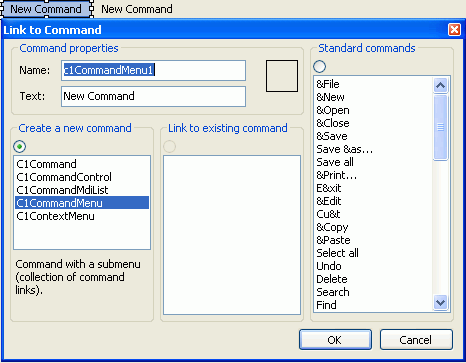
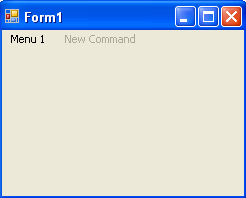
3. Enter **Menu 1** in the **Text** field and select **OK**. The graphic shows the menu item on your form at design time:
## See Also
[Adding a Menu Item After the Current Menu Item](/componentone/docs/win/online-menus-toolbar/menusandtoolbarsforw2/menutasks/addingamenuitemafter)