# C1TopicBar Toolbars
Get started with Menus and Toolbars for WinForms. Create versatile menus and docking/floating toolbars. See more in documentation here.
## Content
The Smart Designer for the [C1TopicBar](/componentone/docs/win/online-menus-toolbar/) control provides the following toolbars for the topic bar, topic page, and topic link:
* C1TopicBar Toolbar
* C1TopicPage Toolbar
* C1TopicLink Toolbar
The **TopicBar**, [C1TopicPage](/componentone/docs/win/online-menus-toolbar/), and [C1TopicLink](/componentone/docs/win/online-menus-toolbar/) toolbars appear for the [C1TopicBar](/componentone/docs/win/online-menus-toolbar/) control.
### C1TopicBar Toolbar
The [C1TopicBar](/componentone/docs/win/online-menus-toolbar/) toolbar appears for the [C1TopicBar](/componentone/docs/win/online-menus-toolbar/)control. To expose the [C1TopicBar](/componentone/docs/win/online-menus-toolbar/) toolbar, select the C1TopicBar control and position your cursor anywhere on the [C1TopicBar](/componentone/docs/win/online-menus-toolbar/) control.
### Opening and Closing the C1TopicBar Toolbar
To open the [C1TopicBar](/componentone/docs/win/online-menus-toolbar/) toolbar, click on the  button. To close the [C1TopicBar](/componentone/docs/win/online-menus-toolbar/) toolbar, click on the  button.
The [C1TopicBar](/componentone/docs/win/online-menus-toolbar/) toolbar consists of the following command buttons:
| Toolbar Button | Description |
| --- | --- |
|  | **Add topic page**: Adds a new topic page. |
|  | **Edit Pages**: Opens the **C1TopicPage Collection Editor** where you can add or remove **C1TopicPages** or modify their property settings. |
|  | **Edit topicbar appearance and layout**: Opens the **C1TopicBar Appearance** dialog box where you can modify the appearance, behavior, and layout styles for the **C1TopicBar** control. |
|  | **Edit miscellaneous properties**: Opens the **Miscellaneous** dialog box for the C1TopicBar control where you can apply miscellaneous properties to the **C1TopicBar** control. |
### Add new page
Clicking on the **Add New Page** button adds a new topic page after the existing topic page.
### Edit Pages
Clicking on the **Edit Pages** button opens the **C1TopicPage Collection Editor** where you can add or remove [C1TopicPage](/componentone/docs/win/online-menus-toolbar/)s or modify their property settings.
### Edit topicbar appearance and layout
Clicking on the **Edit topicbar appearance and layout** opens the **C1TopicBar properties** dialog box where you can modify the appearance, behavior, and layout styles for the [C1TopicBar](/componentone/docs/win/online-menus-toolbar/) control.
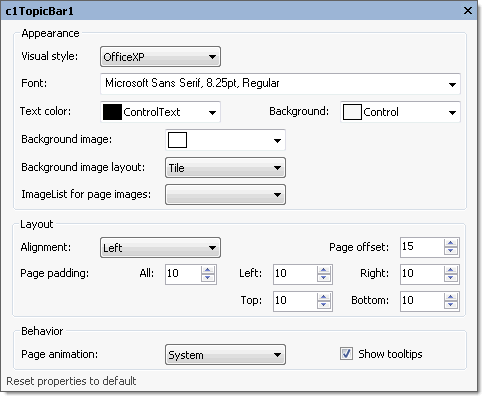
The following table defines the items included in the **C1TopicBar properties** dialog box:
| Item | Description |
| --- | --- |
| **_Appearance_** | |
| **Visual style** | The **Visual style** drop-down box contains the following items for you to select from to change the style of the C1TopicBar control: **Custom**, **System**, **Office2007Blue**, **Office2007Black**, **Office2007Silver**, **Office2003Blue**, **Office2003Olive**, **Office2003Silver**, **OfficeXP**, **Classic**, and **WindowsXP**. |
| **Font** | The **Font** drop-down box opens the Font dialog box where you can modify the Font style properties for the C1TopicBar control. |
| **Text color** | The **Foreground** drop-down list box contains the Custom, System, and Web colors for you to select from to set the Foreground color for the C1TopicBar control. |
| **Background** | The **Background** drop-down list box contains the Custom, System, and Web colors for you to select from to set the back color of the highlighted item in the C1TopicBar control. |
| **Background image** | The **Background image** drop-down box opens an Open dialog box where you can apply the background image used for the C1TopicBar control. |
| **Background image layout** | The **Background image layout** drop-down box opens a list of layout items (None, Tile, Center, Stretch, and Zoom) for you to select from that gets the background image layout for the C1TopicBar control. |
| **ImageList for page images** | The **ImageList** for page images drop-down box gets the image list used to provide the images shown on the pages' title bars. |
| **_Layout_** | |
| **Alignment** | The **Alignment** drop-down box contains Left, Right, and Center items for you to set the alignment of the topicbar pages caption. |
| **Page offset** | The **Page offset** sets the integer value for the space between the pages. |
| **Page padding** | The **Page padding** sets the space between a page border and a link. |
| **_Behavior_** | |
| **Page animation** | The **Page animation** drop-down box contains the available values for you to select from to indicate whether to use animation on page collapsing/expanding. |
| **ShowToolTips** | The **ShowToolTips** check box indicates whether the ToolTip is shown when the mouse is over the page caption. |
| **Reset properties to default** | Selecting the **Reset properties to default** item resets the modified C1TopicBar properties back to their default values. |
### Edit miscellaneous topicbar properties
Clicking on the **Edit miscellaneous topicbar properties** button opens the [C1TopicBar](/componentone/docs/win/online-menus-toolbar/) dialog box where you can modify [C1TopicBar](/componentone/docs/win/online-menus-toolbar/)s miscellaneous properties.
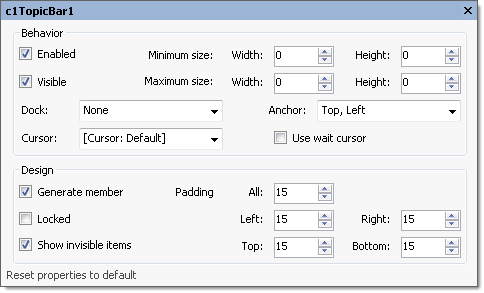
The following table defines the items included in the [C1TopicBar](/componentone/docs/win/online-menus-toolbar/) dialog box:
| Item | Description |
| --- | --- |
| **_Behavior_** | |
| **Enabled** | The **Enabled** check box indicates whether the [C1TopicBar](/componentone/docs/win/online-menus-toolbar/)will be enabled at run time. |
| **Visible** | The **Visible** check box indicates whether the [C1TopicBar](/componentone/docs/win/online-menus-toolbar/)control will be shown at run time. |
| **Minimum size** | The **Minimum** size field includes a Width and Height NumericUpDown controls for specifying the minimum width and height size for the [C1TopicBar](/componentone/docs/win/online-menus-toolbar/)control. |
| **Maximum size** | The **Maximum** size field includes a Width and Height NumericUpDown controls for specifying the maximum width and height size for the [C1TopicBar](/componentone/docs/win/online-menus-toolbar/)control. |
| **Dock** | The **Dock** drop-down box contains items for you to select from to define which border of the [C1TopicBar](/componentone/docs/win/online-menus-toolbar/)control is bound to the container. |
| **Cursor** | The **Cursor** drop-down box opens a list of different cursor items for you to set the type of cursor that appears when the pointer moves over the [C1TopicBar](/componentone/docs/win/online-menus-toolbar/)control. |
| **Use wait cursor** | The **Use wait cursor** check box indicates whether to use wait cursor. |
| **Anchor** | The Anchor drop-down box defines the edges of the container to which the [C1TopicBar](/componentone/docs/win/online-menus-toolbar/)control is bound. When it's anchored to an edge, the distance between the [C1TopicBar](/componentone/docs/win/online-menus-toolbar/)’s closest edge and the specified edge will remain constant. |
| **_Design_** | |
| **Generate member** | The **Generate member** check box indicates whether to generate the member for the [C1TopicBar](/componentone/docs/win/online-menus-toolbar/)control. (**True**, if selected; **False**, if deselected) |
| **Locked** | The **Locked** check box indicates whether the [C1TopicBar](/componentone/docs/win/online-menus-toolbar/)is locked. (**True**, if selected; **False**, if deselected) |
| **Padding** | The **Padding** specifies the interior spacing of the [C1TopicBar](/componentone/docs/win/online-menus-toolbar/)control. |
| **Reset properties to default** | Selecting the **Reset properties to default** item resets the modified [C1TopicBar](/componentone/docs/win/online-menus-toolbar/)properties back to their default values. |
### C1TopicPage Toolbar
The [C1TopicPage](/componentone/docs/win/online-menus-toolbar/) toolbar appears for the [C1TopicBar](/componentone/docs/win/online-menus-toolbar/) control. To expose the [C1TopicPage](/componentone/docs/win/online-menus-toolbar/) toolbar, select the [C1TopicBar](/componentone/docs/win/online-menus-toolbar/) control, then select the topic page on the [C1TopicBar](/componentone/docs/win/online-menus-toolbar/) and slide your cursor anywhere on the [C1TopicPage](/componentone/docs/win/online-menus-toolbar/).
The [C1TopicPage](/componentone/docs/win/online-menus-toolbar/) toolbar consists of one command button:
| Toolbar Button | Description |
| --- | --- |
|  | **Add topic link**: Adds a new topic link in the active topic page. |
|  | **Edit the topic page appearance**: Opens the properties dialog box for the selected **C1TopicPage**. |
|  | **Delete topic page**: Removes the selected **C1TopicPage** from the **C1TopicBar**. |
### Add new topic link
Clicking on the **Add topic link** button adds a new topic link to the topic page in the [C1TopicBar](/componentone/docs/win/online-menus-toolbar/) control.
### Edit topic page appearance
Clicking on the **Edit topic page appearance** button opens the **properties** dialog box for the selected [C1TopicPage](/componentone/docs/win/online-menus-toolbar/).
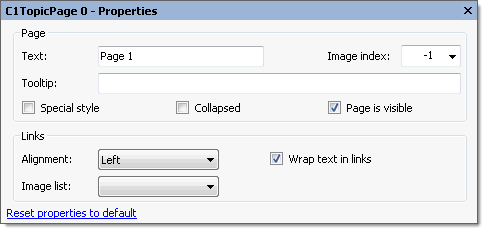
The following table defines the items included in the **C1TopicBar properties** dialog box:
| Item | Description |
| --- | --- |
| **_Page_** | |
| **Text** | The **Text** textbox displays the text name that appears on the caption. To rename the text name for the caption select the text in the Text textbox and type the desired text name. |
| **Tooltip** | The **Tooltip** textbox sets the ToolTip text for the selected topic page. To add a ToolTip, enter text in the **Tooltip** textbox. |
| **Image index** | The **Image** **index** drop-down list box displays the index value of the command image. |
| **Special style** | The **Special style** check box indicates whether the page has a special dark title. (**True**, if selected; **False**, if deselected). |
| **Collapsed** | The **Collapsed** check box indicates whether the page is collapsed or not. (**True**, if selected; **False**, if deselected). |
| **Page is visible** | The **Page** is visible check box indicates whether the page is visible or not. (**True**, if selected; **False**, if deselected). |
| **_Links_** | |
| **Alignment** | The **Alignment** drop-down box contains Left, Right, and Center alignment options to set the alignment for the page's links. |
| **Wrap text in links** | The **Wrap text in links** check box indicates whether the page's link text wraps if its length exceeds the page width. (**True**, if selected; **False**, if deselected). |
| **Image list** | The **Image list** sets the image list used to provide images shown in page links. |
| **Reset properties to default** | Selecting the **Reset properties to default** item resets the modified **C1TopicPage** properties back to their default values. |
### Delete topic page
Clicking on the **Delete topic page** button removes the selected topic page from the [C1TopicBar](/componentone/docs/win/online-menus-toolbar/).
## See Also
[C1ToolBar Toolbar](/componentone/docs/win/online-menus-toolbar/designtimesupport/c1commandsmartdesign/smartdesignerfloatin/c1toolbartoolbar)