# C1NavBar Toolbars
Get started with Menus and Toolbars for WinForms. Create versatile menus and docking/floating toolbars. See more in documentation here.
## Content
The [C1NavBar](/componentone/docs/win/online-menus-toolbar/) toolbar appears for the [C1NavBar](/componentone/docs/win/online-menus-toolbar/) control. To expose the [C1NavBar](/componentone/docs/win/online-menus-toolbar/) toolbar, select the [C1NavBar](/componentone/docs/win/online-menus-toolbar/) control and slide your cursor on the [C1NavBar](/componentone/docs/win/online-menus-toolbar/) control.
### Opening and Closing the C1NavBar Toolbar
To open the [C1NavBar](/componentone/docs/win/online-menus-toolbar/) toolbar, click on the  button. To close the [C1NavBar](/componentone/docs/win/online-menus-toolbar/) toolbar, click on the  button.
The [C1NavBar](/componentone/docs/win/online-menus-toolbar/) toolbar consists of the following command buttons:
| Toolbar Button | Description |
| --- | --- |
|  | **Add button and corresponding panel**: Add buttons to **C1NavBar**. |
|  | **Edit navigation bar appearance and layout**: Set the color and font styles and apply images to the **C1NavBar** control. |
|  | **Edit miscellaneous navigation bar properties**: Opens the **C1NavBar** dialog box for the **C1NavBar** control where you can apply behavior properties to the **C1NavBar** control. |
### Add button and corresponding panel
Clicking on the **Add button and corresponding panel** button adds a tab after the existing tab.
### Edit navigation bar appearance and layout
Clicking on the **Edit navigation bar appearance and layout** button opens the **C1NavBar properties** dialog box where you can modify the appearance properties for the [C1NavBar](/componentone/docs/win/online-menus-toolbar/).
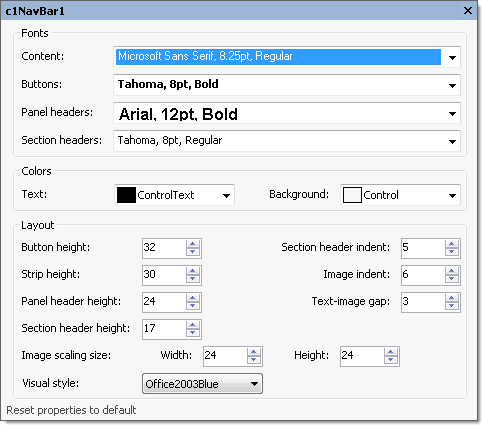
The following table defines the items included in the [C1NavBar](/componentone/docs/win/online-menus-toolbar/) properties dialog box:
| Item | Description |
| --- | --- |
| **_Fonts_** | |
| **Content** | The **Contents** drop-down box opens the Font dialog box where you can modify the Font style properties for the content in the **C1NavBar** control. |
| **Buttons** | The **Buttons** drop-down box opens the **Font** dialog box where you can modify the Font style properties for the buttons in the **C1NavBar** control. |
| **Panel headers** | The **Panel headers** drop-down box opens the **Font** dialog box where you can modify the Font style properties for the panel header in the **C1NavBar** control. |
| **Section headers** | The **Section headers** drop-down box opens the **Font** dialog box where you can modify the Font style properties for the section header in the **C1NavBar** control. |
| **_Colors_** | |
| **Text** | The **Text** drop-down list box contains the Custom, System, and Web colors for you to select from to set the Foreground color for the menu control. |
| **Background** | The **Background** drop-down list box contains the Custom, System, and Web colors for you to select from to set the back color of the **C1NavBar** control. |
| **_Layout_** | |
| **ButtonHeight** | The **ButtonHeight** sets the integer value for the height of the button. |
| **Section header indent** | The **Section header indent** determines the space before the text caption in a section header. |
| **StripHeight** | The **StripHeight** sets the integer value for the strip height of the button. |
| **ImageIndent** | The **ImageIndent** drop-down box sets the integer value for the height of the panel header. |
| **PanelHeaderHeight** | The **PanelHeaderHeight** sets the integer value for the height of the panel header. |
| **Text-image gap** | The **Text-image gap** gets the space between the image and the text on a stack button. |
| **SectionHeaderHeight** | The **SectionHeaderHeight** sets the integer value for the height of the section header. |
| **Image scaling size** | The **Image scaling size** sets the size, in pixels, of an image displayed on a stack button. The default is 24 x 24 pixels. To set the width for the image, use the **Width** numericupdown box and to set the height for the image, use the **Height** numericupdown box. |
| **Visual style** | The **Visual style** drop-down box contains the following items for you to select from to change the style of the C1NavBar control: **Custom**, **System**, **Office2007Blue**, **Office2007Black**, **Office2007Silver**, **Office2003Blue**, **Office2003Olive**, **Office2003Silver**, **OfficeXP**, **Classic**, and **WindowsXP**. |
| **Reset properties to default** | Selecting the **Reset properties to default** item resets the modified **C1NavBar** properties back to their default values. |
### Edit miscellaneous navigation bar properties
Clicking on the **Edit miscellaneous navigation bar properties** button opens the [C1NavBar](/componentone/docs/win/online-menus-toolbar/) dialog box where you can modify [C1NavBar](/componentone/docs/win/online-menus-toolbar/)s miscellaneous properties.
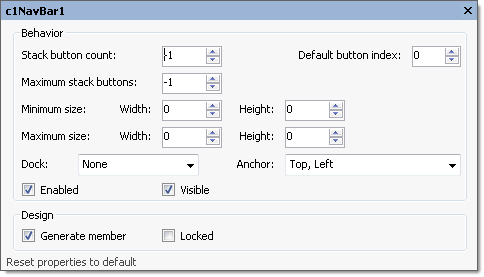
The following table defines the items included in the [C1NavBar](/componentone/docs/win/online-menus-toolbar/) properties dialog box:
| Item | Description |
| --- | --- |
| **_Behavior_** | |
| **StackButtonCount** | The **StackButtonCount** gets or sets the number of buttons displayed in the stack. |
| **DefaultButtonIndex** | The **DefaultButtonIndex** specifies the index of the button to be selected when the form opens. |
| **Maximum stack buttons** | The **Maximum stack buttons** gets or sets the maximum number of buttons in the stack. If set to -1 the maximum number is unlimited. |
| **Minimum size** | The **Minimum size** field includes a Width and Height NumericUpDown controls for specifying the minimum width and height size for the **C1NavBar** control. |
| **Maximum size** | The **Maximum size** field includes a Width and Height NumericUpDown controls for specifying the maximum width and height size for the **C1NavBar** control. |
| **Dock** | The **Dock** drop-down box contains items for you to select from to define which border of the **C1NavBar** control is bound to the container. |
| **Anchor** | The **Anchor** drop-down box defines the edges of the container to which the **C1NavBar** control is bound. When it's anchored to an edge, the distance between the **C1NavBar**'s closest edge and the specified edge will remain constant. |
| **Enabled** | The **Enabled** check box indicates whether the **C1NavBar** control will be enabled at run time. |
| **Visible** | The **Visible** check box indicates whether the **C1NavBar** will be shown at run time. |
| **_Design_** | |
| **Generate member** | The **Generate member** check box indicates whether to generate the member for the **C1NavBar** control. (**True**, if selected; **False**, if deselected) |
| **Locked** | The **Locked** check box indicates whether the **C1NavBar** is locked. (**True**, if selected; **False**, if deselected) |
| **Reset properties to default** | Selecting the **Reset properties to default** item resets the modified **C1NavBar** miscellaneous properties back to their default values. |
## See Also
[C1OutBar Toolbars](/componentone/docs/win/online-menus-toolbar/designtimesupport/c1commandsmartdesign/smartdesignerfloatin/c1outbartoolbars)