# TopicPage Collection Editor
Get started with Menus and Toolbars for WinForms. Create versatile menus and docking/floating toolbars. See more in documentation here.
## Content
The **C1TopicPage Collection Editor** allows the user to add or remove the pages in the [C1TopicBar](/componentone/docs/win/online-menus-toolbar/) control as well as edit the pages' properties.
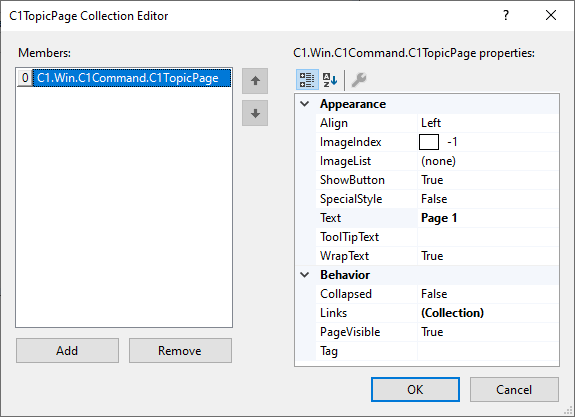
### To access the C1TopicPage Collection Editor:
There are two ways to access the **C1TopicPage Collection Editor**, either through the **Pages** property in the **C1TopicBar** **Properties** window, or the **Edit Pages** in the **C1TopicBar Tasks** menu. For more information about how to use the **C1TopicBar Tasks** menu, see [C1TopicBar Smart Tag](/componentone/docs/win/online-menus-toolbar/designtimesupport/c1commandsmarttags/c1topicbarsmarttag).
### Option 1
1. Drop a [C1TopicBar](/componentone/docs/win/online-menus-toolbar/) onto the form.
2. Click on the **ellipsis** button next to the **Pages** property in the [C1TopicBar](/componentone/docs/win/online-menus-toolbar/)s Properties window.
### Option 2
1. Drop a [C1TopicBar](/componentone/docs/win/online-menus-toolbar/) onto the form.
2. Click on the smart tag () in the upper right corner of the [C1TopicBar](/componentone/docs/win/online-menus-toolbar/) control and then click on **Edit Pages** from the **C1TopicBar Tasks** menu.
## See Also
[TopicLink Collection Editor](/componentone/docs/win/online-menus-toolbar/designtimesupport/c1commandcollectione/c1topiclinkcollectio)