# Map Source
Learn about the different sources for Map control to display geographical info.
## Content
The **Map** control can display geographical information on a map from several sources. You can use the TileSource property to specify the tile source used by the map for its tile layer. Map provides three built-in tile sources to display geographic information. This topic also covers custom map source.
### Virtual Earth Aerial Source
Users can set the TileSource property to an instance of VirtualEarthAerialSource class to let the Map control access Microsoft's Virtual Earth aerial tiles.
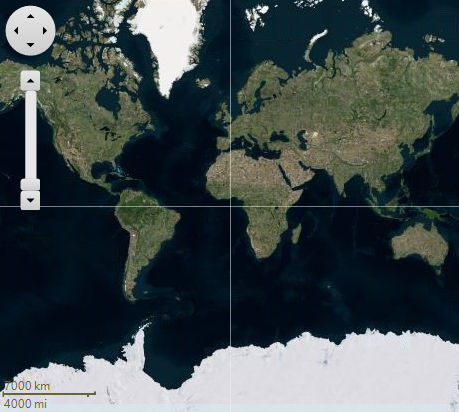
The code snippet below shows how to set VirtualEarthAerialSource.
```csharp
//set the source property
c1Map1.TileLayer.TileSource = new VirtualEarthAerialSource();
```
### Virtual Earth Road Source
Users can set the TileSource property to an instance of VirtualEarthRoadSource class to let the Map control access Microsoft's Virtual Earth aerial tiles.
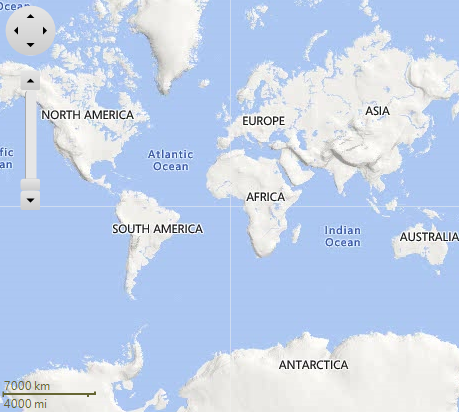
The code snippet below shows how to set VirtualEarthRoadSource.
```csharp
//set the source property
c1Map1.TileLayer.TileSource = new VirtualEarthRoadSource();
```
### Virtual Earth Hybrid Source
Users can set the TileSource property to an instance of VirtualEarthHybridSource class to let the Map control access Microsoft's Virtual Earth aerial tiles.
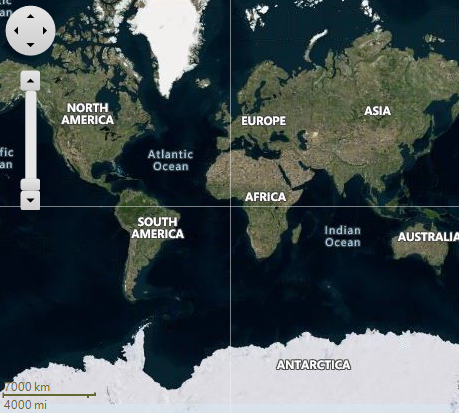
The code snippet below shows how to set VirtualEarthHybridSource.
```csharp
//set the source property
c1Map1.TileLayer.TileSource = new VirtualEarthHybridSource();
```
### Customizable Map Source
Maps can display online maps from various built-in and custom sources. By default, as discussed before, Maps provides three built-in sources: aerial, road and hybrid views. Maps also makes it easy to use the online map tiles of your choice. We include custom samples using the Open Street Maps and the public CloudMade Midnight Commander.
Let's see how to use a custom map source.
Users can set the TileSource property to an instance of a custom source. For instance, here we have used the OpenStreetMap service as the tile source.
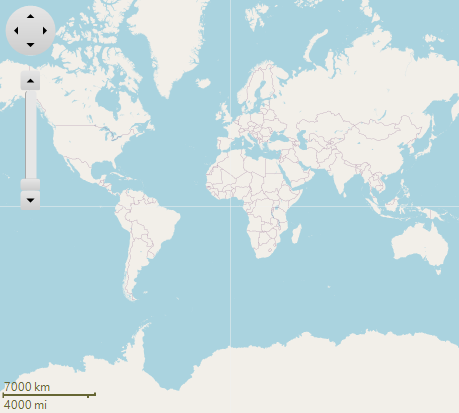
For this purpose, the user needs to create a class OpenStreetTileSource, such that it is inherited from **ITileSource** interface.
```csharp
class OpenStreetTileSource : ITileSource
{
private const string UrlTemplate = "http://tile.openstreetmap.org/{0}/{1}/{2}.png";
public void GetTile(int level, int x, int y, out string url, out object image)
{
image = null;
url = string.Format(UrlTemplate, level, x, y);
}
public int TileWidth { get { return 256; } }
public int TileHeight { get { return 256; } }
}
```
Further, you can add the instance of this class to the TileSource property.
```csharp
//custom map source
OpenStreetTileSource openStreetTileSource = new OpenStreetTileSource();
c1Map1.TileLayer.TileSource = openStreetTileSource;
```