# Legend
Legends are crucial for displaying info on maps. C1Map allows you to add legends using the MapLegendItem class.
## Content
Legends in maps provide valuable information, which helps in interpreting what the map is displaying. Legends can be represented in various colors and shapes based on the data. You can add legends to describe the vector elements and markers on a map.
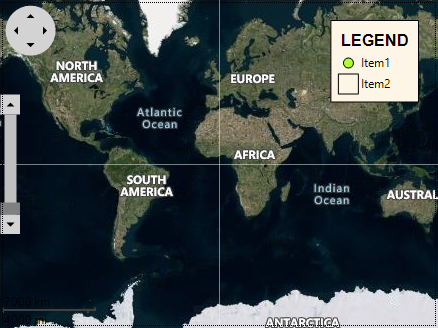
Legends can be displayed on a map using MapLegend class. On adding a Legend, you are required to add the legend items on it which can be displayed using MapLegendItem class.
The following code can be used to add and customize the legend and legend items on a map:
```csharp
// Adding map source
c1Map1.TileLayer.TileSource = new VirtualEarthHybridSource();
// Adding legend
var legend = new C1.Win.Map.MapLegend();
c1Map1.Legends.Add(legend);
legend.Alignment = ContentAlignment.TopRight;
legend.Margin = new Padding(0, 20, 20, 0);
legend.Padding = new Padding(5);
legend.Layout = MapLegendLayout.Column;
legend.Style.Border.Width = 1;
legend.Style.BackColor = Color.OldLace;
legend.Title.Caption = "LEGEND";
legend.Title.Position = DockStyle.Top;
legend.Title.Padding = new Padding(5);
legend.Title.Style.Alignment = ContentAlignment.MiddleCenter;
legend.Title.Style.Font = new Font("Arial", 12, FontStyle.Bold);
legend.Title.Style.ForeColor = Color.Black;
var item1 = new C1.Win.Map.MapLegendItem();
legend.Items.Add(item1);
item1.Label = "Item1";
item1.Kind = MapLegendItemKind.Marker;
item1.Shape = MarkerShape.Circle;
item1.Style.BackColor = Color.GreenYellow;
item1.Style.ForeColor = Color.Black;
var item2 = new C1.Win.Map.MapLegendItem();
legend.Items.Add(item2);
item2.Kind = MapLegendItemKind.Rectangle;
item2.Label = "Item2";
item2.Style.ForeColor = Color.Black;
item2.Size = new SizeF(20, 20);
item2.Style.Alignment = ContentAlignment.MiddleLeft;
```